> ## Documentation Index
> Fetch the complete documentation index at: https://docs.partnero.com/llms.txt
> Use this file to discover all available pages before exploring further.
# Integrate Tally
Sync Tally form submissions to create partners or customers automatically. Partnero offers two integration methods:
1. Direct form link
2. From linked from website
We'll go through both methods below. These instructions with auto-generated code snippets can be found on your Partnero account, under **Integration** > **Tally**: 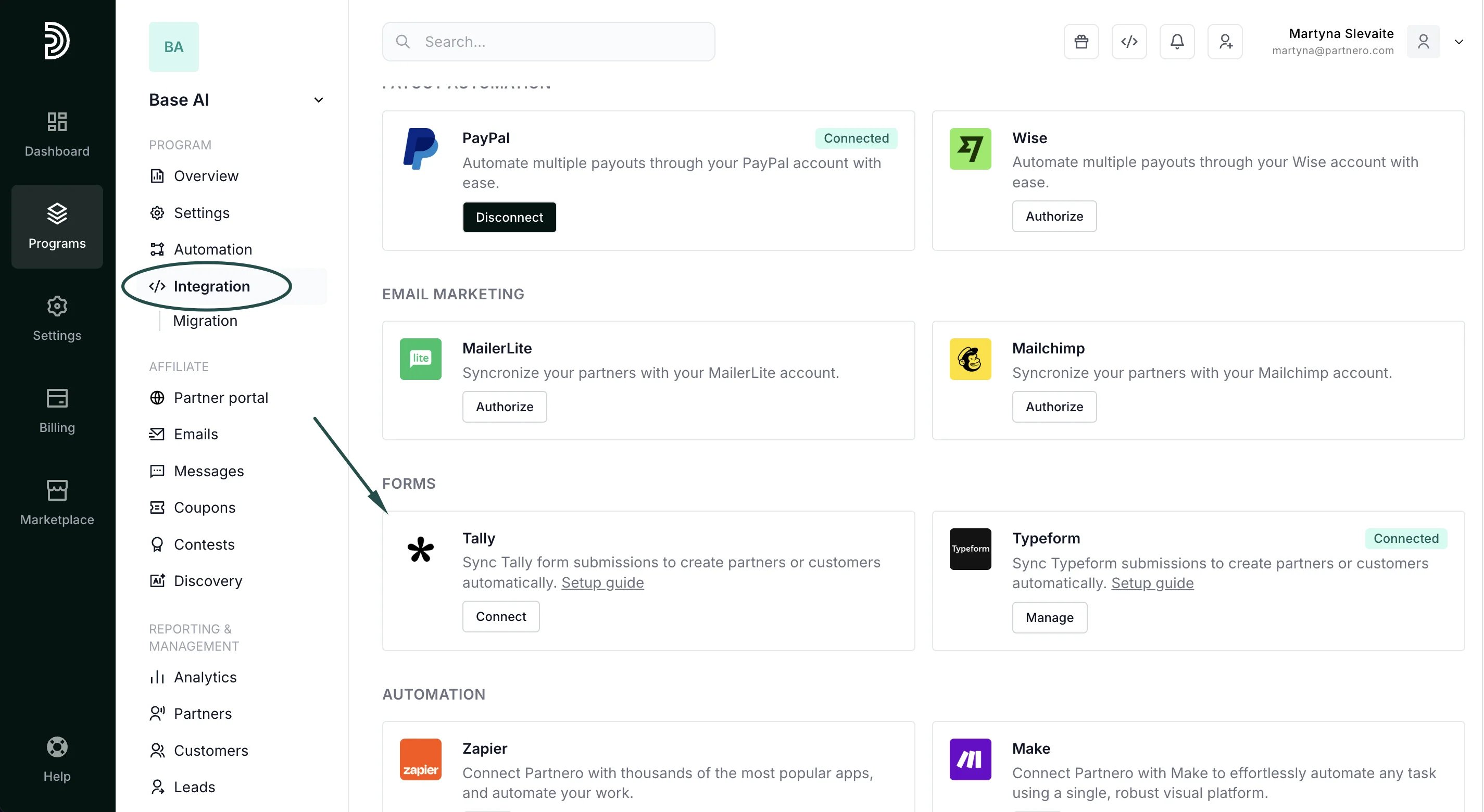 ***
### Method 1: Direct form link
Choose this when partners share a direct link to your Tally form with their referral key in the URL, for example:
[https://tally.so/r/YOUR\\\_FORM\\\_ID?aff=PARTNER\\\_KEY](https://tally.so/r/YOUR\\_FORM\\_ID?aff=PARTNER\\_KEY)
Tally automatically captures URL parameters into hidden fields, no scripts needed.
#### Step 1: Add a hidden field to your Tally form
1. Open your form in the Tally editor.
2. Add a Hidden fields block to your form:
***
### Method 1: Direct form link
Choose this when partners share a direct link to your Tally form with their referral key in the URL, for example:
[https://tally.so/r/YOUR\\\_FORM\\\_ID?aff=PARTNER\\\_KEY](https://tally.so/r/YOUR\\_FORM\\_ID?aff=PARTNER\\_KEY)
Tally automatically captures URL parameters into hidden fields, no scripts needed.
#### Step 1: Add a hidden field to your Tally form
1. Open your form in the Tally editor.
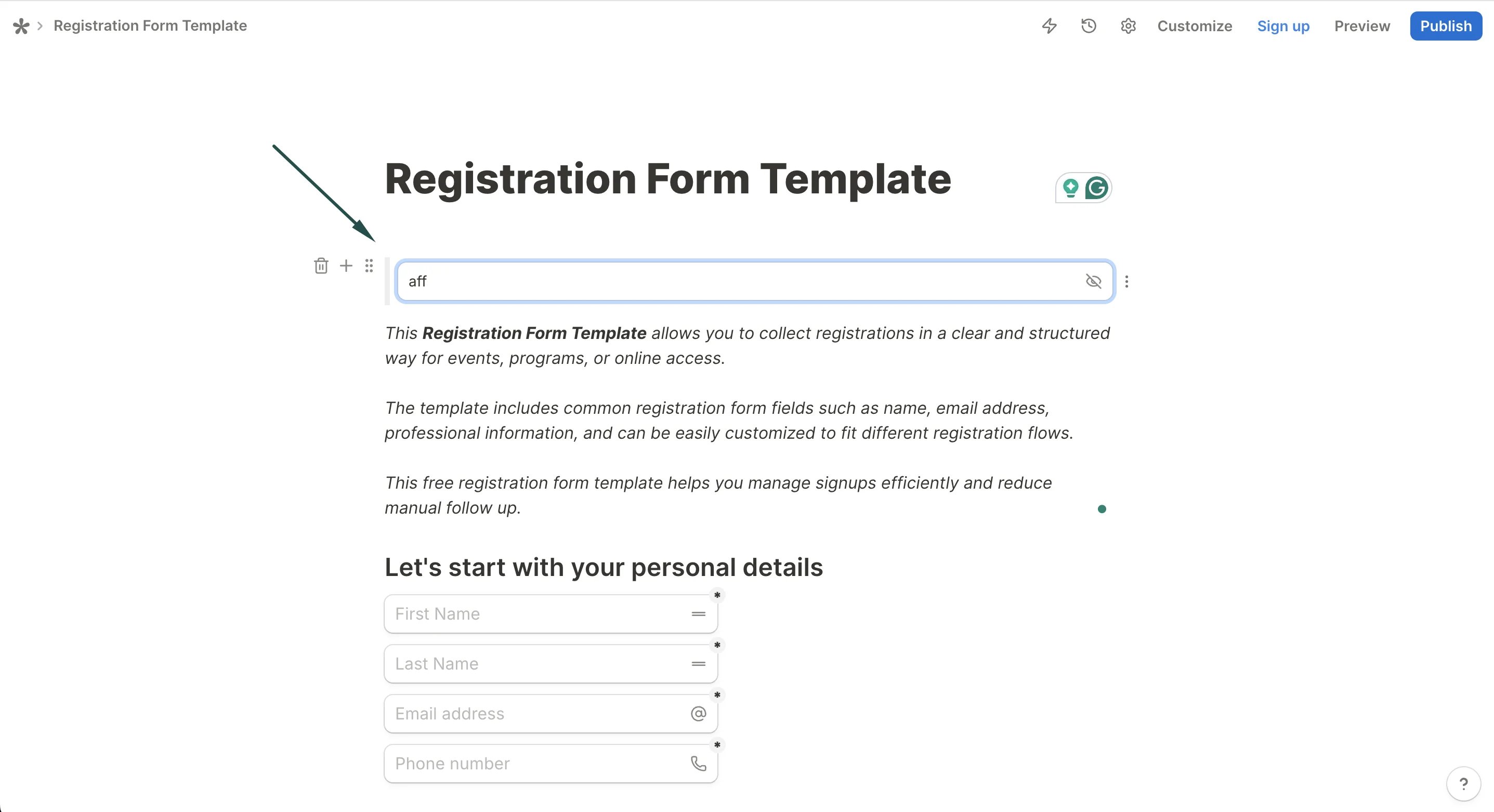
2. Add a Hidden fields block to your form: 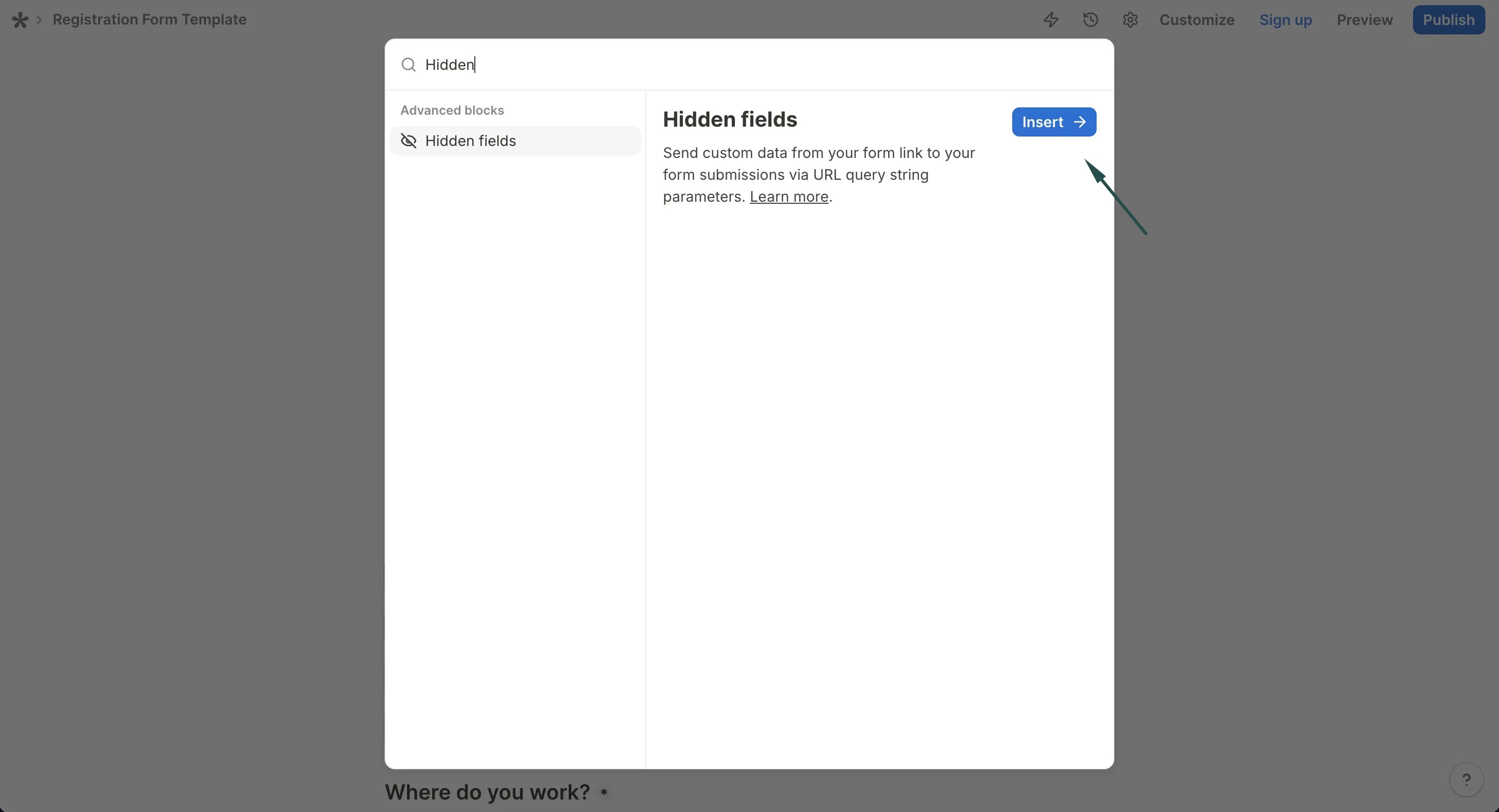 3. Create a hidden field named aff:
  4. Publish your form.
#### Step 2: Connect Tally in Partnero
1. Go to **Integrations** in your Partnero dashboard.
2. Find **Tally** under Forms and click **Connect**:
4. Publish your form.
#### Step 2: Connect Tally in Partnero
1. Go to **Integrations** in your Partnero dashboard.
2. Find **Tally** under Forms and click **Connect**: 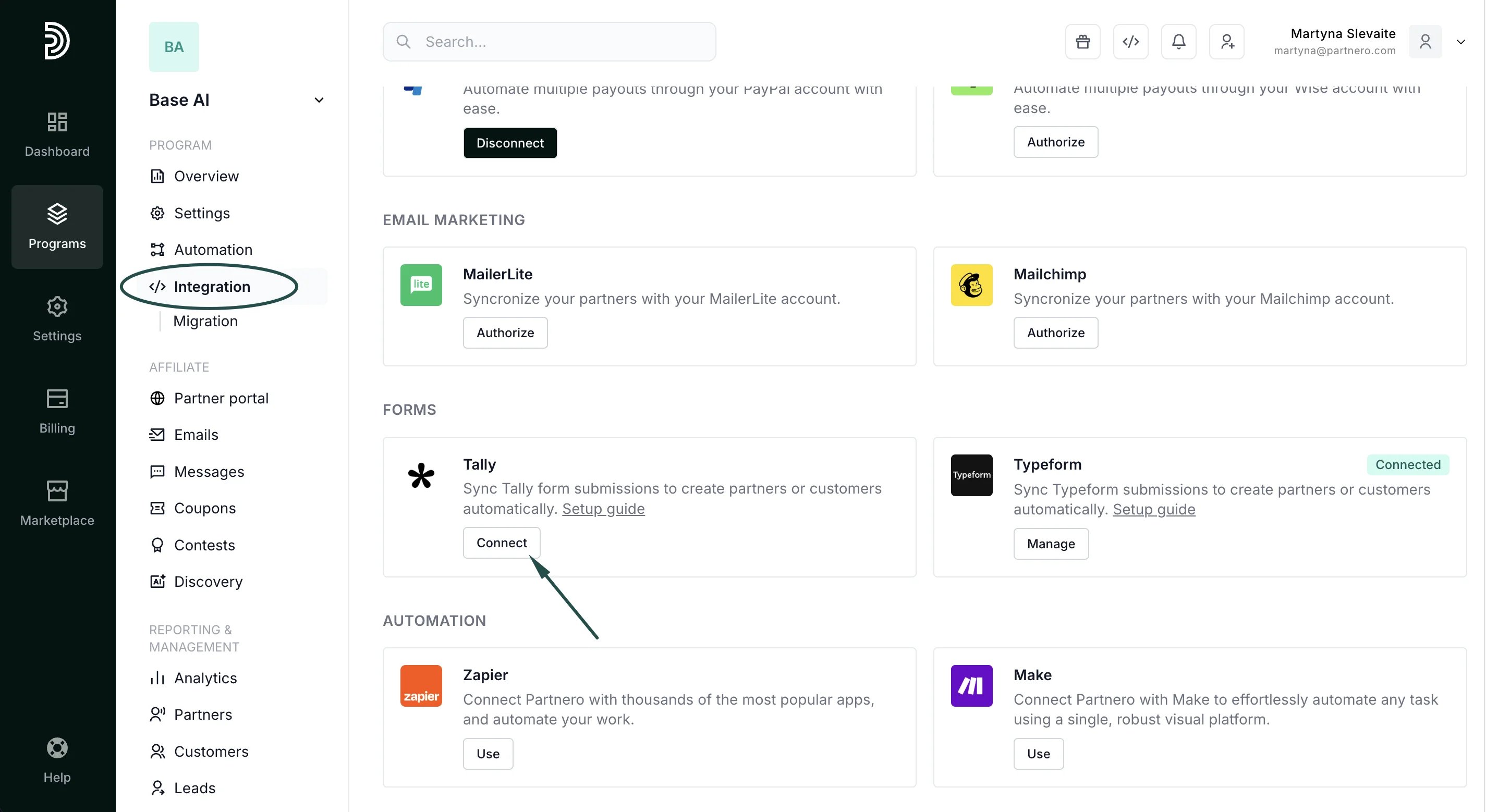 3. In [Tally account](https://tally.so/settings/api-keys) [settings,](https://tally.so/settings/api-keys) create a new API key and add it to Partnero. Click **Connect**.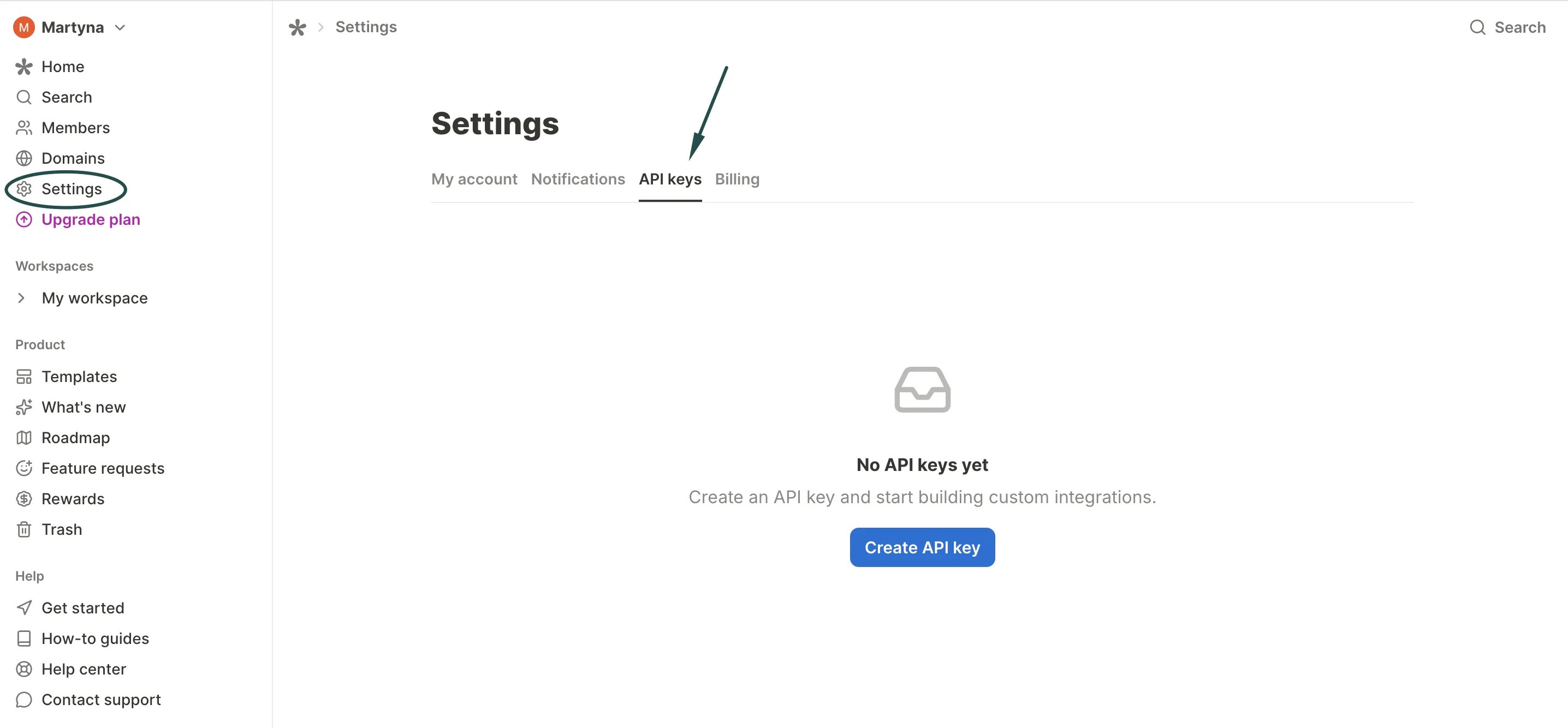
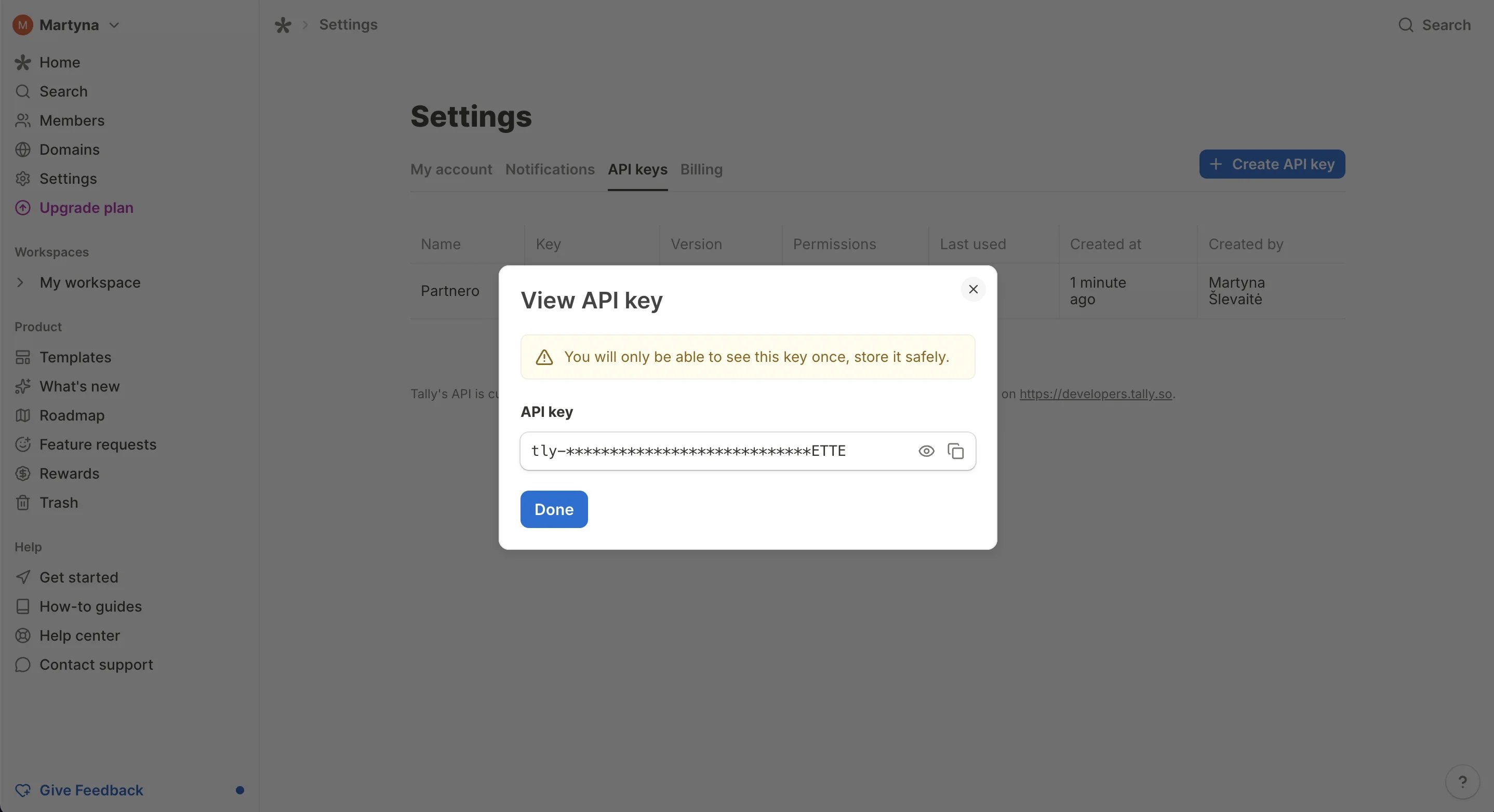
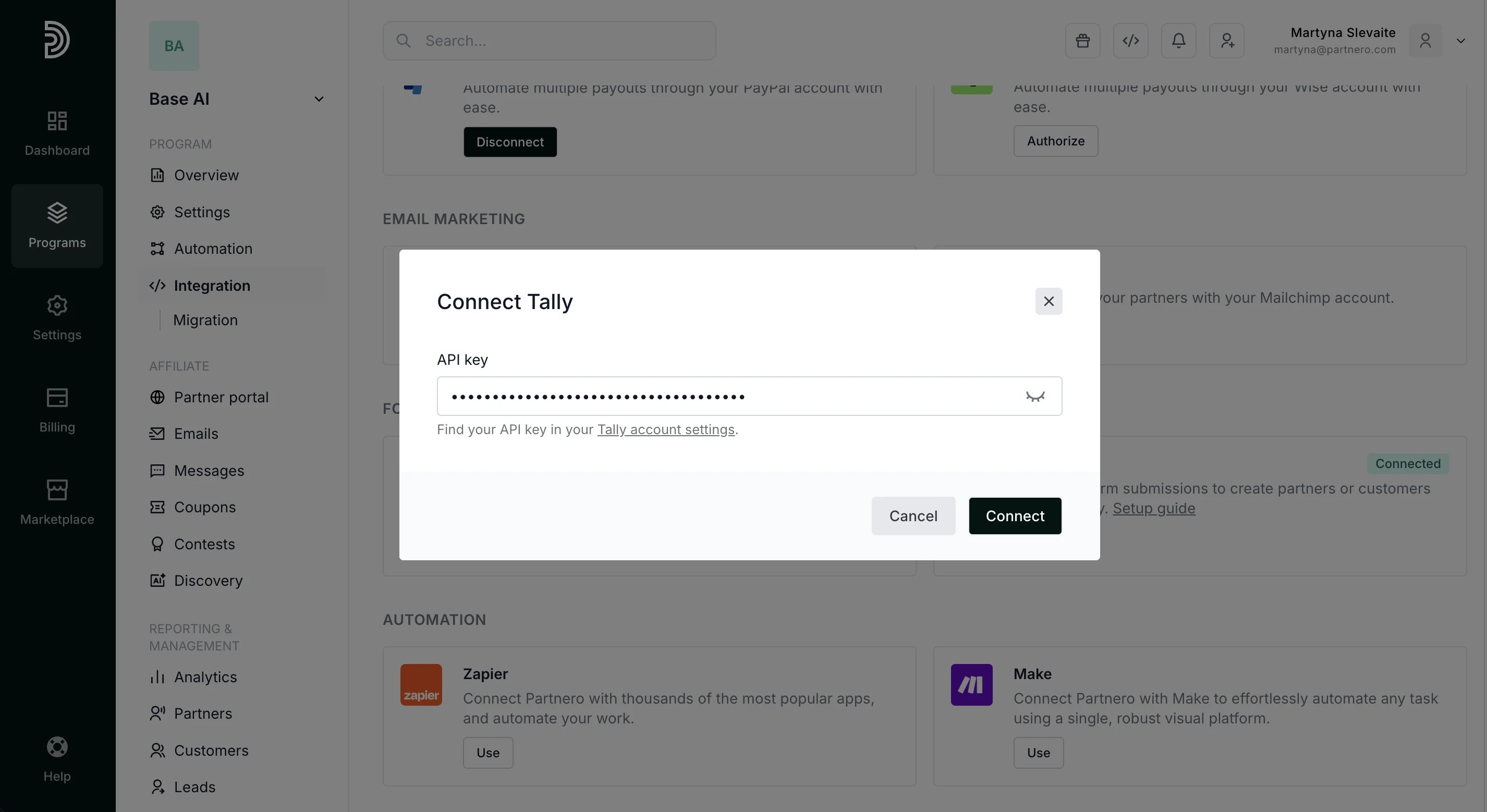 4. Select your form, choose an action (create partner or customer), and map the fields.
5. Make sure to map the hidden field to the Partner key:
4. Select your form, choose an action (create partner or customer), and map the fields.
5. Make sure to map the hidden field to the Partner key: 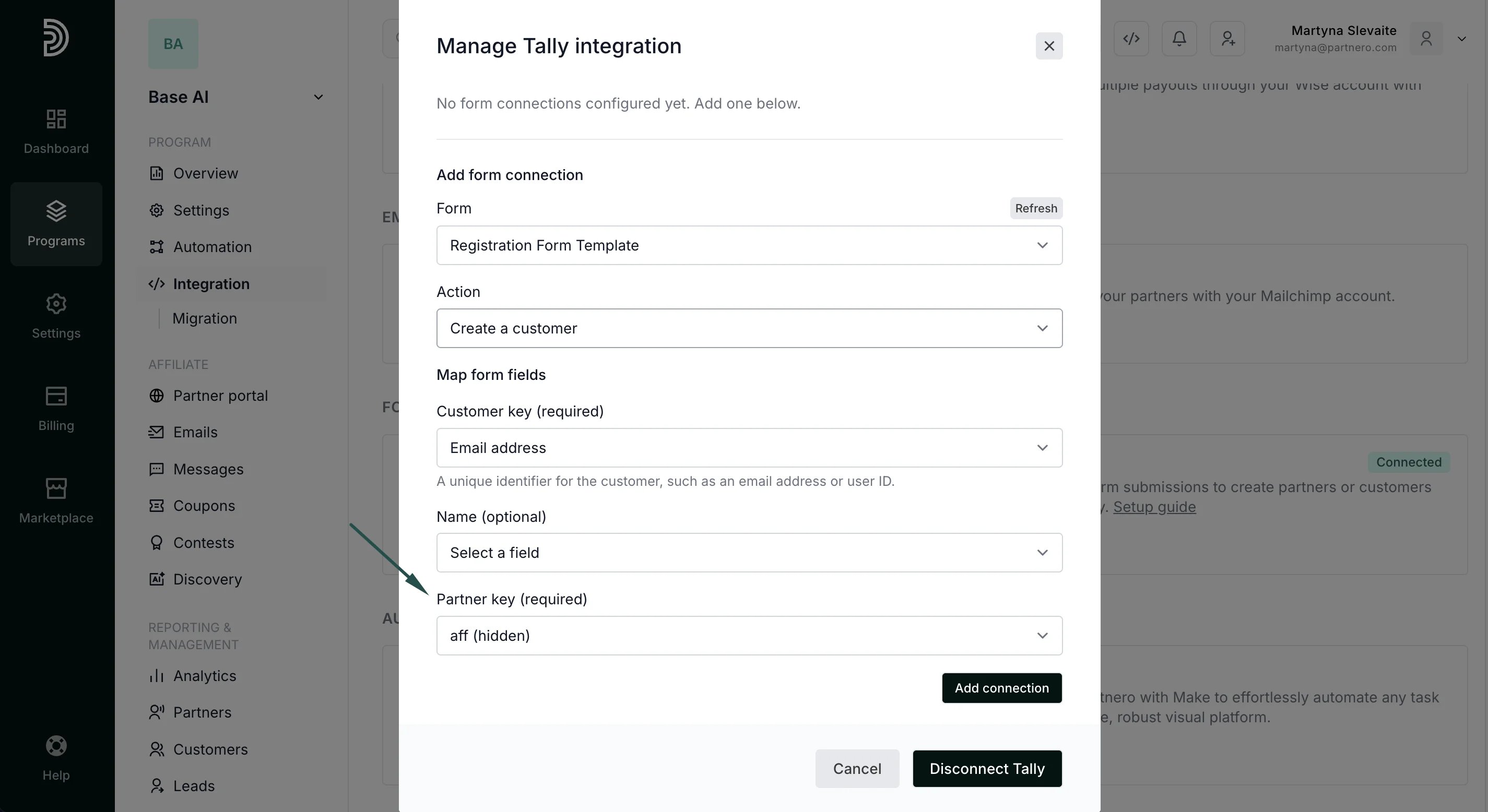 That's it! When someone opens the form link with a partner key in the URL, Tally captures it in the hidden field and sends it to Partnero via webhook.
#### Sales tracking
To complete the integration, you need to share details of successful sales with Partnero. You can do this in a few ways:
* Use Stripe or Paddle Billing integrations
* Implementing tracking through the [Partnero API](https://docs.partnero.com/guides/tracking/affiliate-api#sending-sales-data)
* Implementing tracking through the [Partnero JS](https://docs.partnero.com/guides/tracking/javascript-tracking#sales-tracking)
* Use Zapier or Make to connect everything.
***
### Method 2: Form linked on website
Choose this when your website has Partnero tracking installed and contains a link to a Tally form. A small script will read the referral key from the tracking cookie and append it to your Tally form links automatically.
#### Step 1: Install the tracking script on your website
Add the PartneroJS snippet to your website to track visitors and store the referral key in a cookie. The PartneroJS snippet can be found under **Integration** → **Program details**:
That's it! When someone opens the form link with a partner key in the URL, Tally captures it in the hidden field and sends it to Partnero via webhook.
#### Sales tracking
To complete the integration, you need to share details of successful sales with Partnero. You can do this in a few ways:
* Use Stripe or Paddle Billing integrations
* Implementing tracking through the [Partnero API](https://docs.partnero.com/guides/tracking/affiliate-api#sending-sales-data)
* Implementing tracking through the [Partnero JS](https://docs.partnero.com/guides/tracking/javascript-tracking#sales-tracking)
* Use Zapier or Make to connect everything.
***
### Method 2: Form linked on website
Choose this when your website has Partnero tracking installed and contains a link to a Tally form. A small script will read the referral key from the tracking cookie and append it to your Tally form links automatically.
#### Step 1: Install the tracking script on your website
Add the PartneroJS snippet to your website to track visitors and store the referral key in a cookie. The PartneroJS snippet can be found under **Integration** → **Program details**: 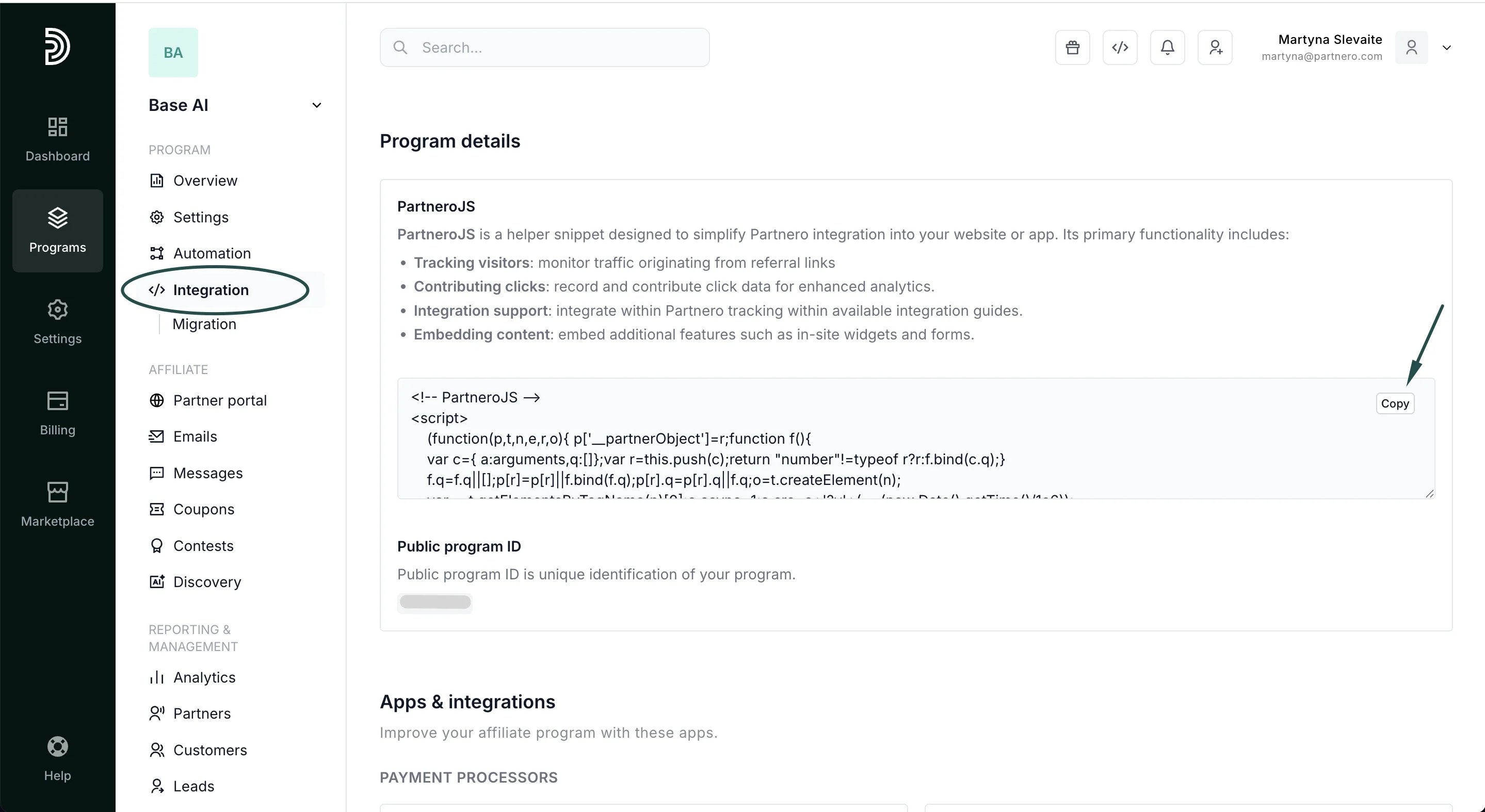 #### Step 2: Add a hidden field to your Tally form
1. Open your form in the Tally editor.
2. Add a **Hidden fields** block to your form.
3. Create a hidden field named aff.
4. Publish your form.
#### Step 3: Add the link script to your website
Open the Tally setup guide on your Partnero account. Switch to the **Form linked on website** tab and scroll to Step 3:
#### Step 2: Add a hidden field to your Tally form
1. Open your form in the Tally editor.
2. Add a **Hidden fields** block to your form.
3. Create a hidden field named aff.
4. Publish your form.
#### Step 3: Add the link script to your website
Open the Tally setup guide on your Partnero account. Switch to the **Form linked on website** tab and scroll to Step 3: 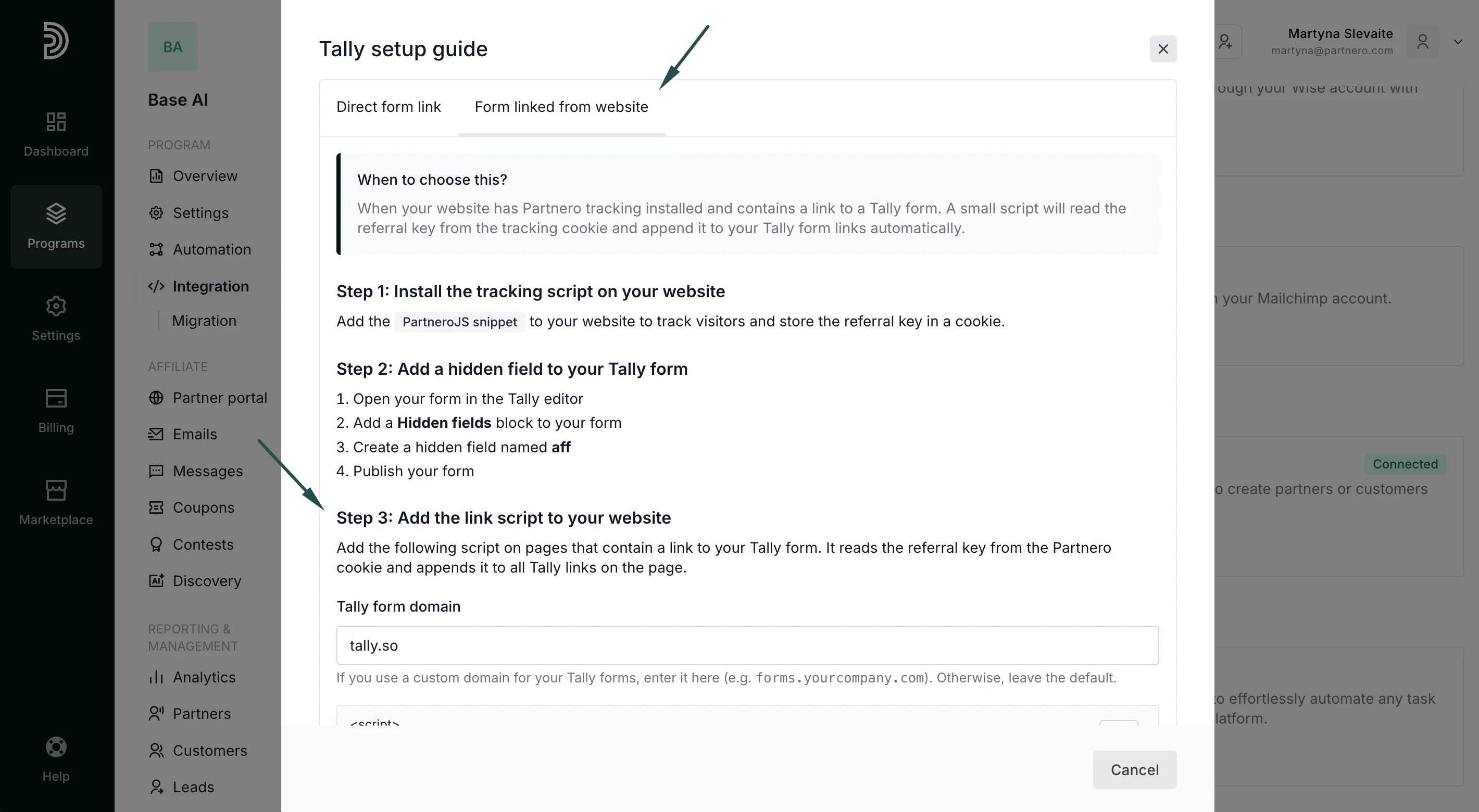 If you use a custom domain for your Tally forms (e.g., forms.yourcompany.com), add it to the **Tally form domain** field. Otherwise, leave the default.
Copy the provided script. Add it to the pages that contain Tally forms.
#### Step 4: Connect Tally in Partnero
1. Go to **Integrations** in your Partnero dashboard.
2. Find Tally under Forms and click **Connect**.
3. Enter your Tally API key (from [Tally account settings](https://tally.so/settings/api-keys)).
4. Select your form, choose an action (create partner or customer), and map the fields.
5. Make sure to map the hidden field to the Partner key.
When a referred visitor clicks a Tally link on your website, the script appends the partner key to the URL. Tally captures it in the hidden field and sends it to Partnero via webhook.
#### Sales tracking
To complete the integration, you need to share details of successful sales with Partnero. You can do this in a few ways:
* Use Stripe or Paddle Billing integrations
* Implementing tracking through the [Partnero API](https://docs.partnero.com/guides/tracking/affiliate-api#sending-sales-data)
* Implementing tracking through the [Partnero JS](https://docs.partnero.com/guides/tracking/javascript-tracking#sales-tracking)
* Use Zapier or Make to connect everything.
This documentation is built and hosted on [Mintlify](https://mintlify.com), a developer documentation platform.
If you use a custom domain for your Tally forms (e.g., forms.yourcompany.com), add it to the **Tally form domain** field. Otherwise, leave the default.
Copy the provided script. Add it to the pages that contain Tally forms.
#### Step 4: Connect Tally in Partnero
1. Go to **Integrations** in your Partnero dashboard.
2. Find Tally under Forms and click **Connect**.
3. Enter your Tally API key (from [Tally account settings](https://tally.so/settings/api-keys)).
4. Select your form, choose an action (create partner or customer), and map the fields.
5. Make sure to map the hidden field to the Partner key.
When a referred visitor clicks a Tally link on your website, the script appends the partner key to the URL. Tally captures it in the hidden field and sends it to Partnero via webhook.
#### Sales tracking
To complete the integration, you need to share details of successful sales with Partnero. You can do this in a few ways:
* Use Stripe or Paddle Billing integrations
* Implementing tracking through the [Partnero API](https://docs.partnero.com/guides/tracking/affiliate-api#sending-sales-data)
* Implementing tracking through the [Partnero JS](https://docs.partnero.com/guides/tracking/javascript-tracking#sales-tracking)
* Use Zapier or Make to connect everything.
This documentation is built and hosted on [Mintlify](https://mintlify.com), a developer documentation platform.