> ## Documentation Index
> Fetch the complete documentation index at: https://docs.partnero.com/llms.txt
> Use this file to discover all available pages before exploring further.
# Analytics overview
Partnero provides a comprehensive analytics suite to measure every stage of your affiliate program, from partner recruitment and click tracking to revenue attribution and payout management.
In this article, we'll review the **Analytics Overview** tab. To access, open your program and click on **Analytics**:
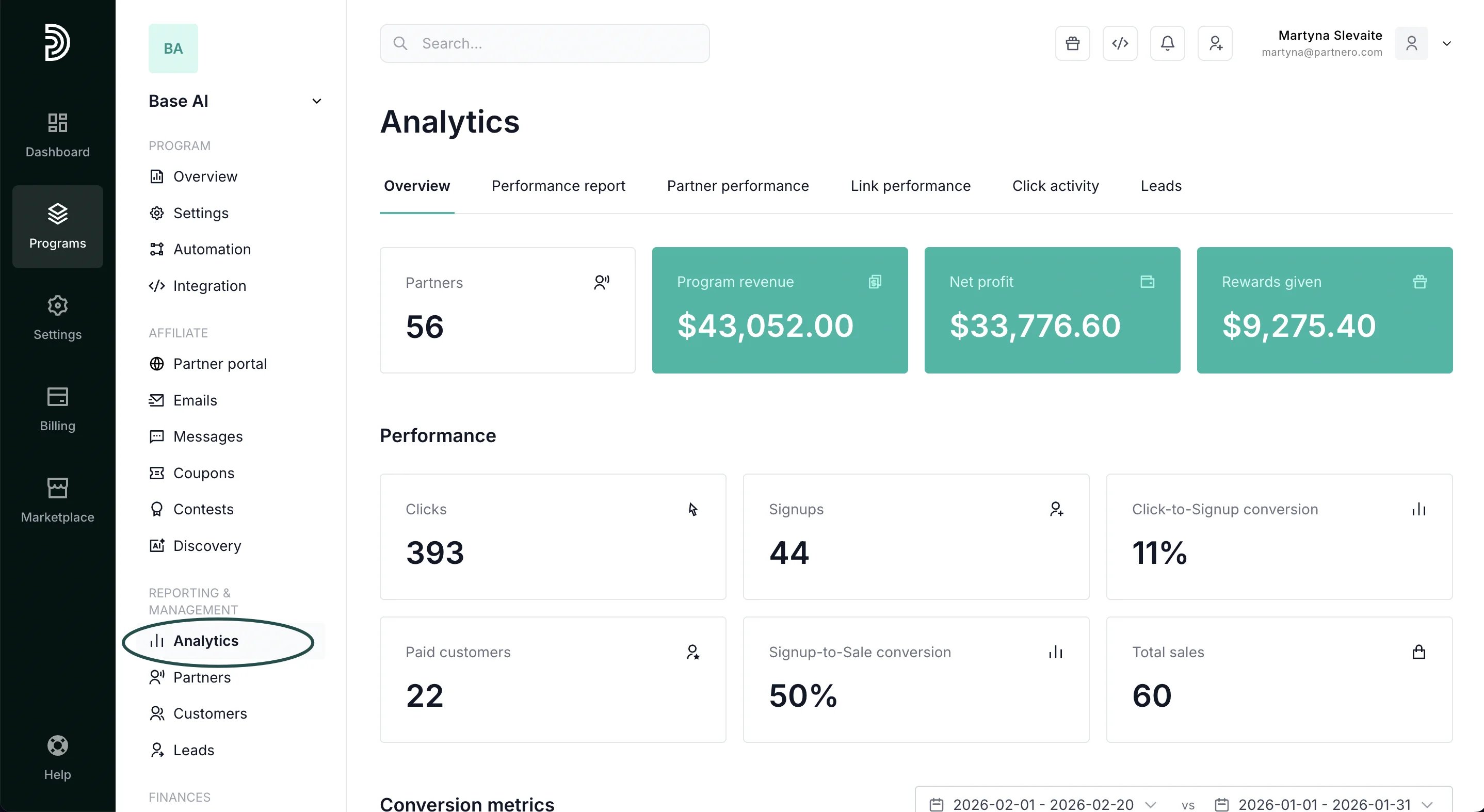 You'll land on the **Overview** tab. Let's review the available metrics below.
***
### Analytics Overview
The **Overview** tab shows the metrics that matter most, without requiring you to set a date range or configure filters. Everything reflects your program's all-time performance.
You'll land on the **Overview** tab. Let's review the available metrics below.
***
### Analytics Overview
The **Overview** tab shows the metrics that matter most, without requiring you to set a date range or configure filters. Everything reflects your program's all-time performance.
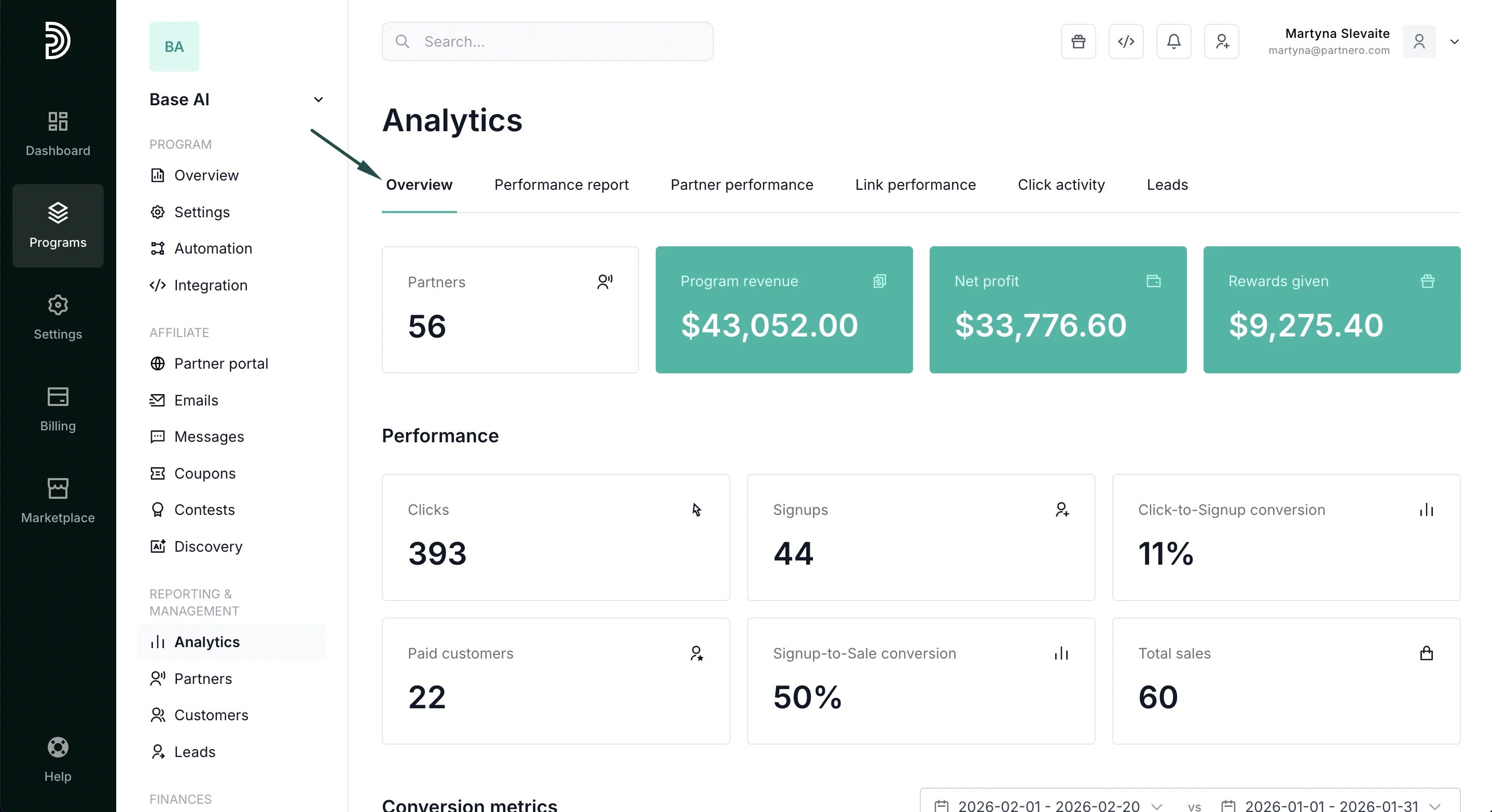 * **Partners**: How many approved affiliates are in your program. Click through to see the full partner list filtered by status.
* **Program revenue**: Total revenue attributed to affiliate referrals. Supports multiple currencies.
* **Net profit**: What you keep after paying partner commissions. Supports multiple currencies.
* **Rewards given**: Total affiliate commissions given.
***
#### Performance
* **Clicks**: Total number of clicks on affiliate links.
* **Signups**: How many referred visitors become registered users.
* **Paid customers**: How many of the signed-up users convert to paying customers.
* **Click-to-signup conversion**: percentage of users who complete a registration after clicking an affiliate link.
* **Signup-to-sale conversion**: percentage of users who purchased a plan after signing up.
* **Total sales**: The number of sales your affiliate program has generated.
***
#### Conversion metrics
Further down, you'll find conversion metrics. Select current and comparison periods to see trends.
* **Partners**: How many approved affiliates are in your program. Click through to see the full partner list filtered by status.
* **Program revenue**: Total revenue attributed to affiliate referrals. Supports multiple currencies.
* **Net profit**: What you keep after paying partner commissions. Supports multiple currencies.
* **Rewards given**: Total affiliate commissions given.
***
#### Performance
* **Clicks**: Total number of clicks on affiliate links.
* **Signups**: How many referred visitors become registered users.
* **Paid customers**: How many of the signed-up users convert to paying customers.
* **Click-to-signup conversion**: percentage of users who complete a registration after clicking an affiliate link.
* **Signup-to-sale conversion**: percentage of users who purchased a plan after signing up.
* **Total sales**: The number of sales your affiliate program has generated.
***
#### Conversion metrics
Further down, you'll find conversion metrics. Select current and comparison periods to see trends.
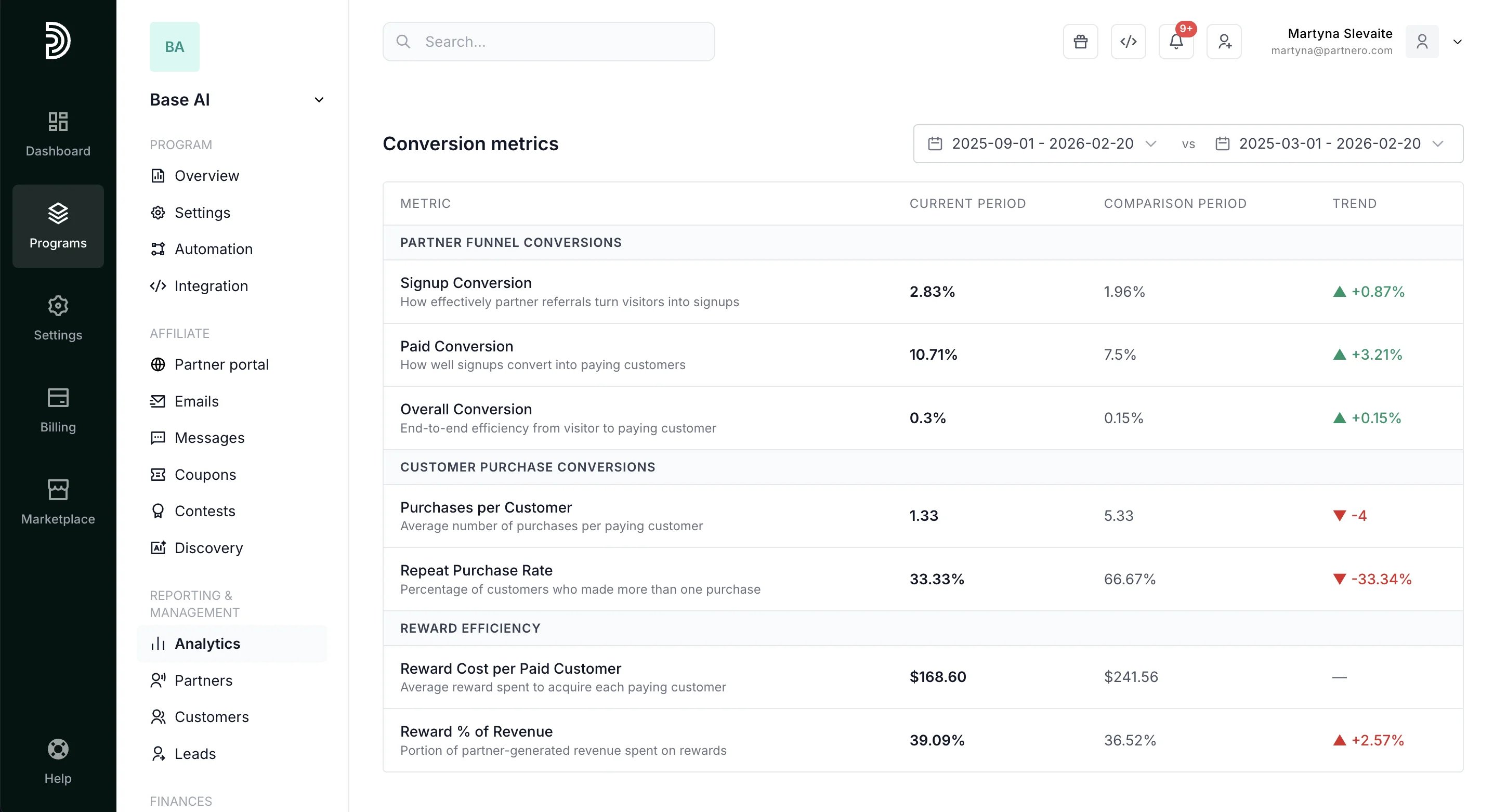 **Partner funnel conversions**
* Signup Conversion: How effectively partner referrals turn visitors into signups
* Paid Conversion: How well signups convert into paying customers
* Overall Conversion: End-to-end efficiency from visitor to paying customer
**Customer purchase conversions**
* Purchases per Customer: Average number of purchases per paying customer
* Repeat Purchase Rate: Percentage of customers who made more than one purchase
**Reward efficiency**
* Reward Cost per Paid Customer: Average reward spent to acquire each paying customer
* Reward % of Revenue: Portion of partner-generated revenue spent on rewards
***
#### Rewards breakdown & distribution
The following two sections cover reward breakdown and distribution.
**Partner funnel conversions**
* Signup Conversion: How effectively partner referrals turn visitors into signups
* Paid Conversion: How well signups convert into paying customers
* Overall Conversion: End-to-end efficiency from visitor to paying customer
**Customer purchase conversions**
* Purchases per Customer: Average number of purchases per paying customer
* Repeat Purchase Rate: Percentage of customers who made more than one purchase
**Reward efficiency**
* Reward Cost per Paid Customer: Average reward spent to acquire each paying customer
* Reward % of Revenue: Portion of partner-generated revenue spent on rewards
***
#### Rewards breakdown & distribution
The following two sections cover reward breakdown and distribution. 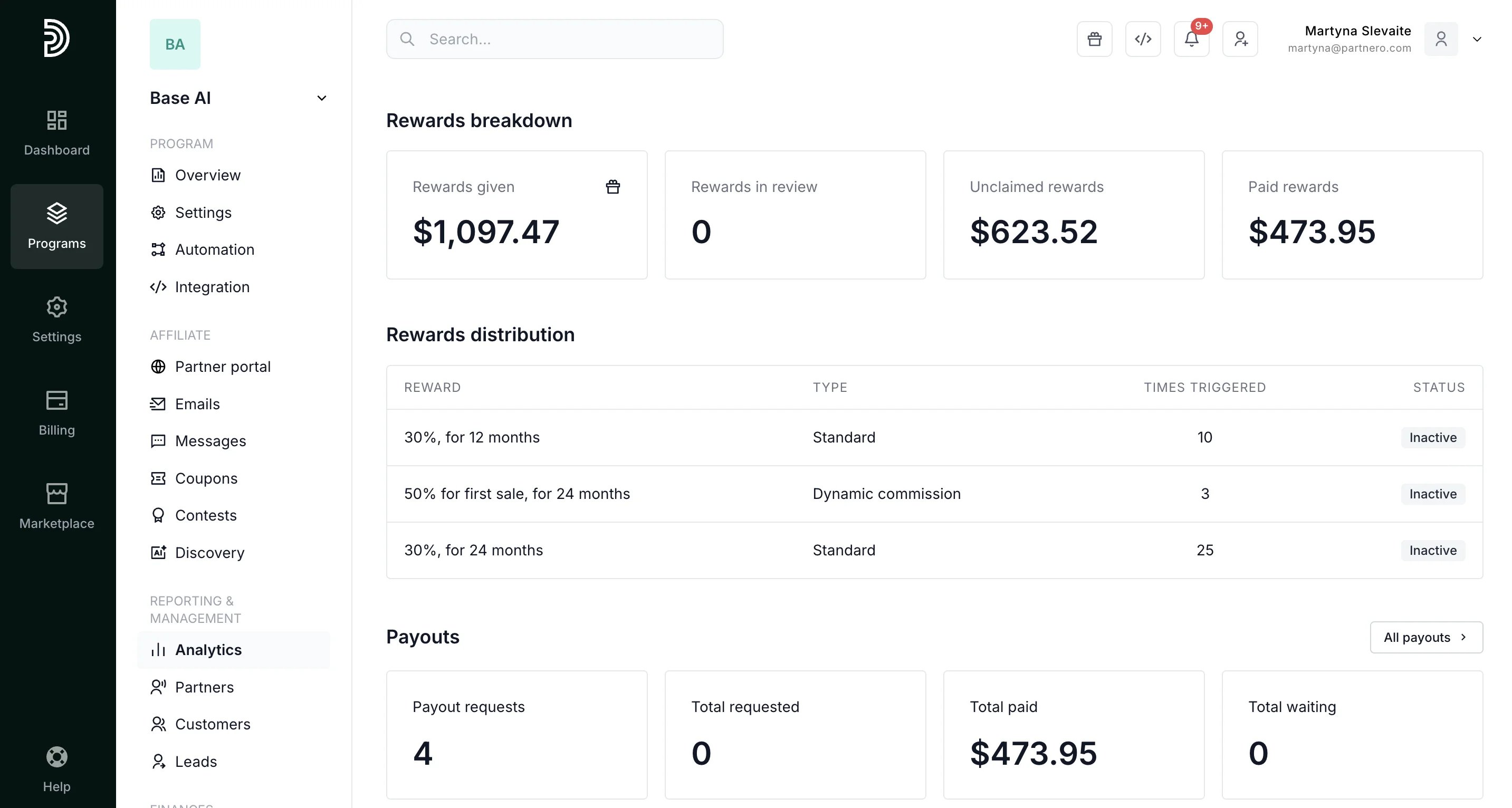 * **Rewards breakdown**: Track affiliate commissions given, unclaimed, in review, and paid.
* **Rewards distribution** by commission rule: See which commission types are triggered most often and whether they're currently active.
***
#### Payouts
Lastly, review Payout metrics.
* **Rewards breakdown**: Track affiliate commissions given, unclaimed, in review, and paid.
* **Rewards distribution** by commission rule: See which commission types are triggered most often and whether they're currently active.
***
#### Payouts
Lastly, review Payout metrics.
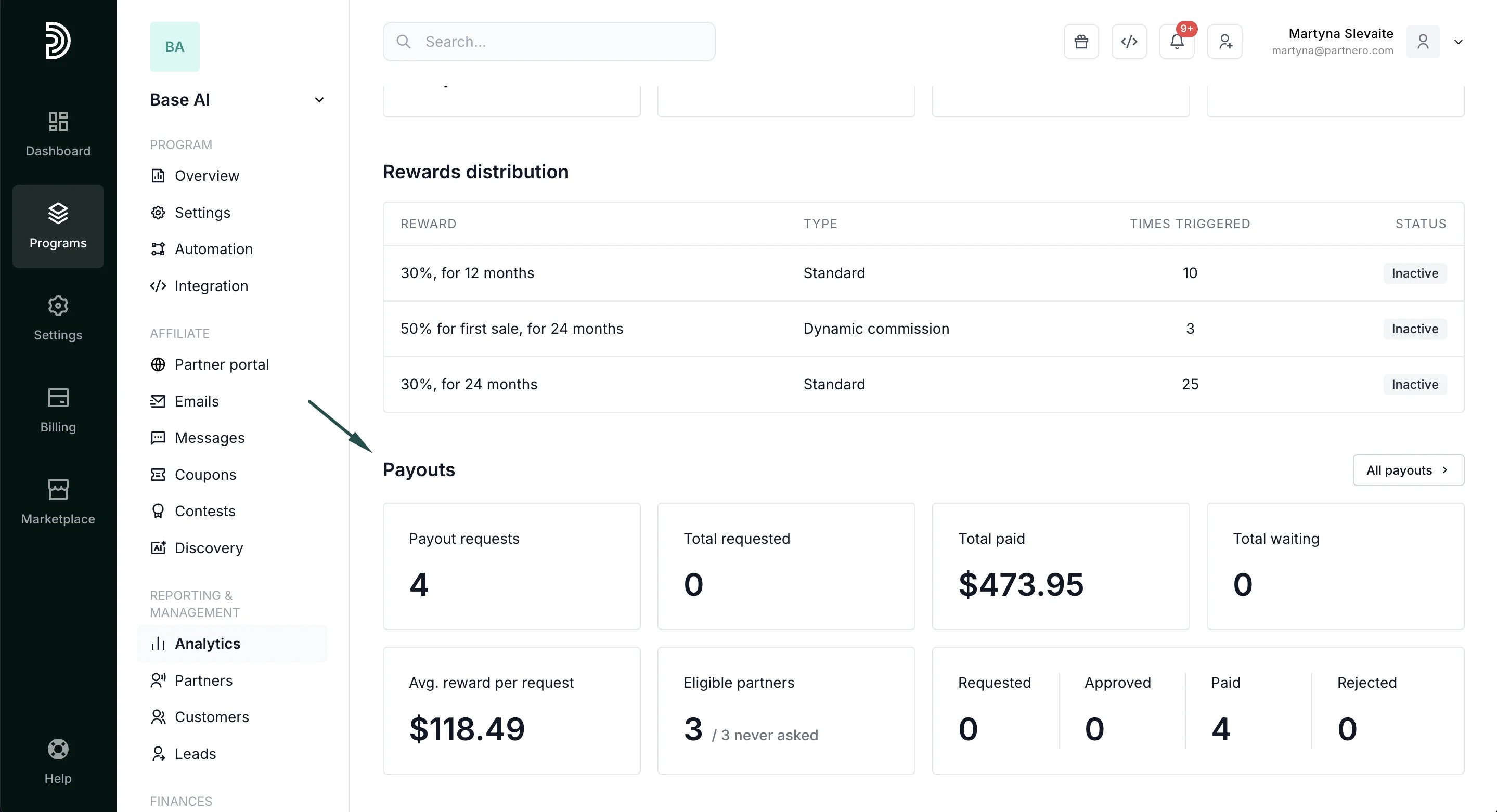 * **Payout requests**: Total number of payout requests submitted
* **Total requested**: Total amount requested in payouts
* **Total paid**: Total amount paid to affiliates.
* **Total waiting**: the total amount requested to be paid.
* **Average reward per request**: The average amount requested in a single payout request.
* **Eligible partners**: The number of partners who have reached the payout threshold but haven't requested a payout.
* The **total numbers** for requested, approved, paid, and rejected payouts.
***
#### Continue reading about analytics
Explore other analytics reports to better understand your performance and optimize your partner program:
* [Performance Report](/knowledge-base/analytics-reporting/performance-report) – Detailed breakdown of conversions, revenue, and partner results
* [Partner Performance](/knowledge-base/analytics-reporting/partner-performance) – Compare and evaluate individual partner results
* [Reward History](/knowledge-base/analytics-reporting/reward-analytics) – Full ledger of every reward issued in your program
* [Link Performance](/knowledge-base/analytics-reporting/link-performance) – Analyze how individual tracking links are performing
* [Click Activity](/knowledge-base/analytics-reporting/click-activity) – Review detailed click-level data and traffic insights
* [Lead Analytics](/knowledge-base/analytics-reporting/lead-analytics-overview) – Monitor lead acquisition trends and quality
This documentation is built and hosted on [Mintlify](https://mintlify.com), a developer documentation platform.
* **Payout requests**: Total number of payout requests submitted
* **Total requested**: Total amount requested in payouts
* **Total paid**: Total amount paid to affiliates.
* **Total waiting**: the total amount requested to be paid.
* **Average reward per request**: The average amount requested in a single payout request.
* **Eligible partners**: The number of partners who have reached the payout threshold but haven't requested a payout.
* The **total numbers** for requested, approved, paid, and rejected payouts.
***
#### Continue reading about analytics
Explore other analytics reports to better understand your performance and optimize your partner program:
* [Performance Report](/knowledge-base/analytics-reporting/performance-report) – Detailed breakdown of conversions, revenue, and partner results
* [Partner Performance](/knowledge-base/analytics-reporting/partner-performance) – Compare and evaluate individual partner results
* [Reward History](/knowledge-base/analytics-reporting/reward-analytics) – Full ledger of every reward issued in your program
* [Link Performance](/knowledge-base/analytics-reporting/link-performance) – Analyze how individual tracking links are performing
* [Click Activity](/knowledge-base/analytics-reporting/click-activity) – Review detailed click-level data and traffic insights
* [Lead Analytics](/knowledge-base/analytics-reporting/lead-analytics-overview) – Monitor lead acquisition trends and quality
This documentation is built and hosted on [Mintlify](https://mintlify.com), a developer documentation platform.