> ## Documentation Index
> Fetch the complete documentation index at: https://docs.partnero.com/llms.txt
> Use this file to discover all available pages before exploring further.
# Analytics: Link performance
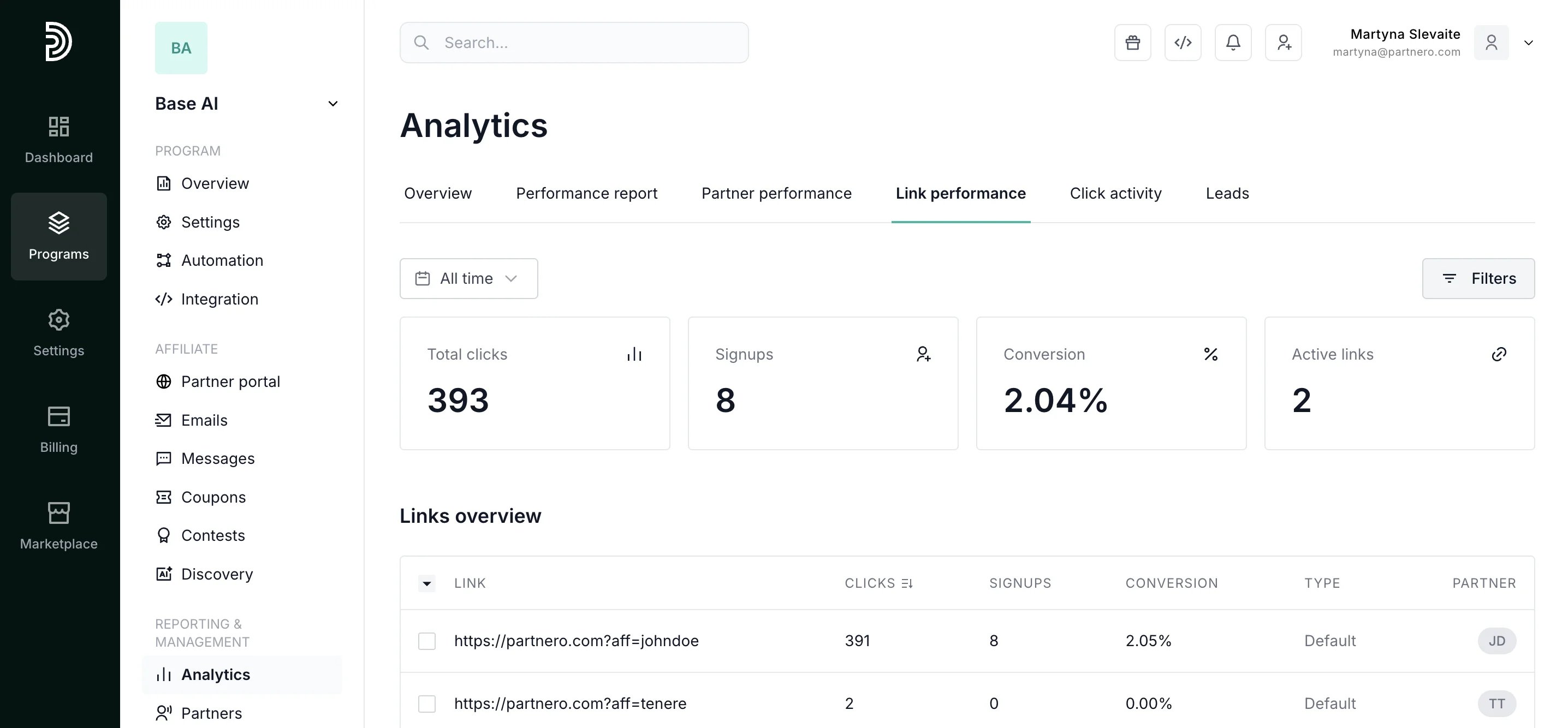
See exactly which affiliate links drive traffic and convert visitors. Every referral link is tracked individually, so you can measure click-to-signup conversion per URL, compare link types, and identify which partners' promotional strategies are working.
To access, open your program, click on **Analytics**, and switch to the **Link performance** tab:
 ***
### Summary metrics
Review the link performance summary metrics:
* **Total clicks**: Aggregate traffic across all affiliate referral links for the selected period.
* **Signups**: How many of those clicks converted into registered users or leads.
* **Conversion rate**: Overall click-to-signup percentage across all links. Benchmark against industry averages to evaluate partner and landing page quality.
* **Active links**: How many unique referral URLs are generating traffic. A low ratio of active links to total partners may indicate partner engagement issues.
Customize the link table:
* **Define your time period**: View all time metrics, select pre-defined periods, or enter a custom time period:
***
### Summary metrics
Review the link performance summary metrics:
* **Total clicks**: Aggregate traffic across all affiliate referral links for the selected period.
* **Signups**: How many of those clicks converted into registered users or leads.
* **Conversion rate**: Overall click-to-signup percentage across all links. Benchmark against industry averages to evaluate partner and landing page quality.
* **Active links**: How many unique referral URLs are generating traffic. A low ratio of active links to total partners may indicate partner engagement issues.
Customize the link table:
* **Define your time period**: View all time metrics, select pre-defined periods, or enter a custom time period: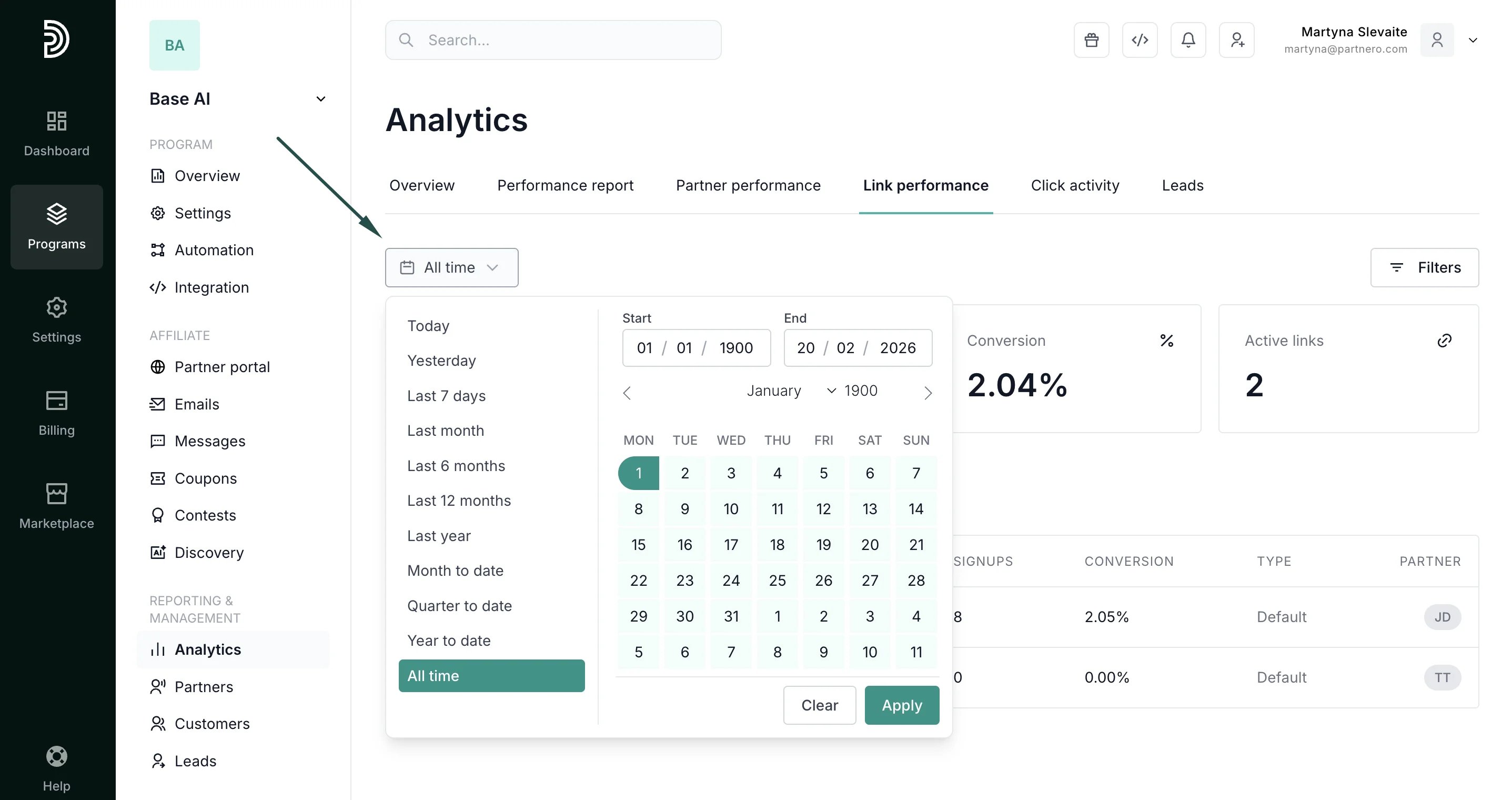 * **Filter by partner**: Drill into one affiliate's links to evaluate their promotional approach.
* **Filter by partner tags**: See the performance of a specific group of partners.
* **Filter by click or signup threshold**: Quickly surface underperforming links (high clicks, zero signups) that may indicate landing page problems, or top performers to replicate.
* **Filter by partner**: Drill into one affiliate's links to evaluate their promotional approach.
* **Filter by partner tags**: See the performance of a specific group of partners.
* **Filter by click or signup threshold**: Quickly surface underperforming links (high clicks, zero signups) that may indicate landing page problems, or top performers to replicate. 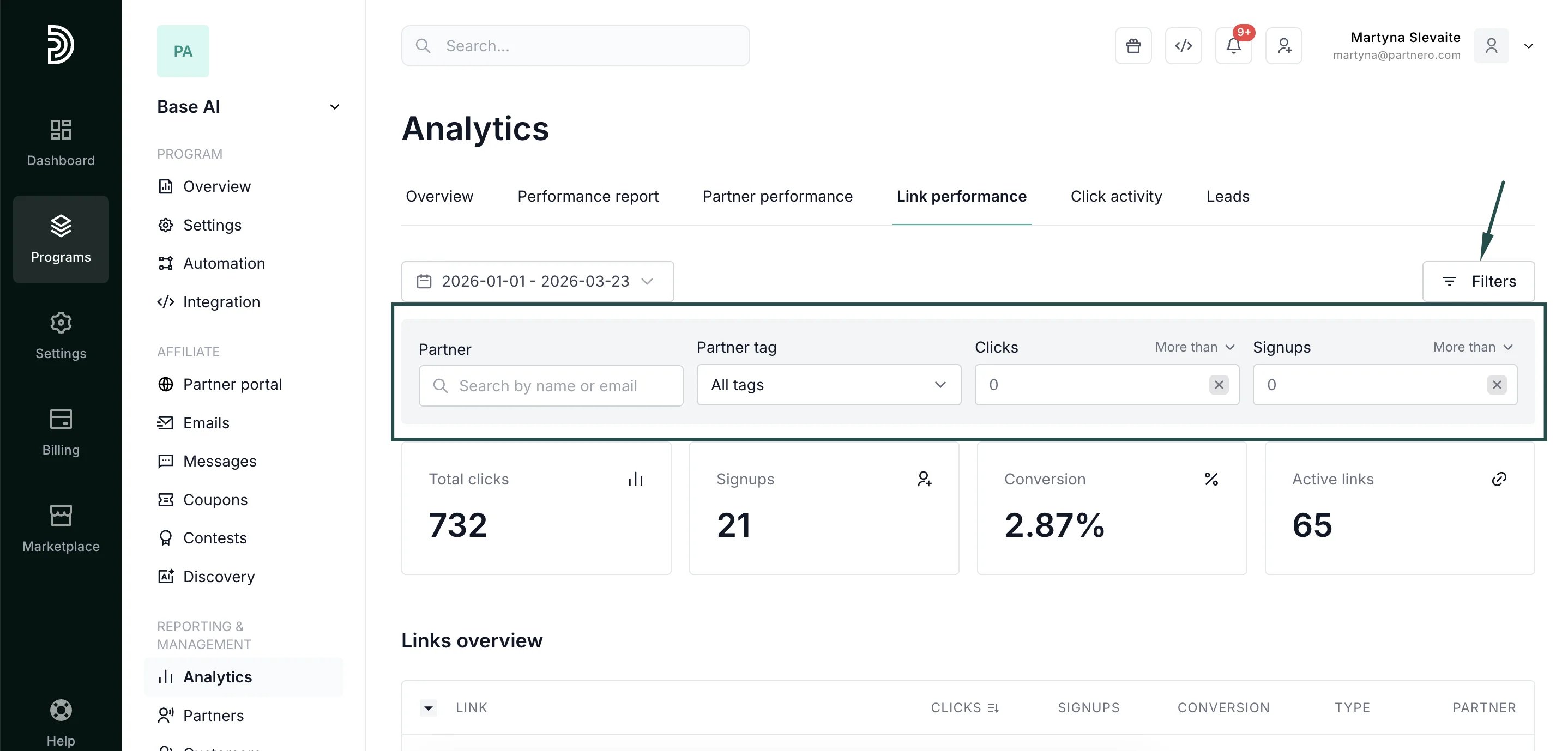 Links overview table:
* **Columns**: Link URL, Clicks, Signups, Conversion rate, Link type (default, custom domain, direct tracking), Partner.
* **Sortable** by clicks, signups, or conversion. Exportable for offline analysis.
Best for: Optimizing landing pages, auditing partner link usage, and identifying which referral URL formats or link types convert best.
***
#### Continue reading about analytics
Explore other analytics reports to better understand your performance and optimize your partner program:
* [Analytics Overview](/knowledge-base/analytics-reporting/analytics-overview) – High-level dashboard summary of your program’s performance
* [Performance Report](/knowledge-base/analytics-reporting/performance-report) – Detailed breakdown of conversions, revenue, and partner results
* [Partner Performance](/knowledge-base/analytics-reporting/partner-performance) – Compare and evaluate individual partner results
* [Click Activity](/knowledge-base/analytics-reporting/click-activity) – Review detailed click-level data and traffic insights
* [Lead Analytics](/knowledge-base/analytics-reporting/lead-analytics-overview) – Monitor lead acquisition trends and quality
This documentation is built and hosted on [Mintlify](https://mintlify.com), a developer documentation platform.
Links overview table:
* **Columns**: Link URL, Clicks, Signups, Conversion rate, Link type (default, custom domain, direct tracking), Partner.
* **Sortable** by clicks, signups, or conversion. Exportable for offline analysis.
Best for: Optimizing landing pages, auditing partner link usage, and identifying which referral URL formats or link types convert best.
***
#### Continue reading about analytics
Explore other analytics reports to better understand your performance and optimize your partner program:
* [Analytics Overview](/knowledge-base/analytics-reporting/analytics-overview) – High-level dashboard summary of your program’s performance
* [Performance Report](/knowledge-base/analytics-reporting/performance-report) – Detailed breakdown of conversions, revenue, and partner results
* [Partner Performance](/knowledge-base/analytics-reporting/partner-performance) – Compare and evaluate individual partner results
* [Click Activity](/knowledge-base/analytics-reporting/click-activity) – Review detailed click-level data and traffic insights
* [Lead Analytics](/knowledge-base/analytics-reporting/lead-analytics-overview) – Monitor lead acquisition trends and quality
This documentation is built and hosted on [Mintlify](https://mintlify.com), a developer documentation platform.