> ## Documentation Index
> Fetch the complete documentation index at: https://docs.partnero.com/llms.txt
> Use this file to discover all available pages before exploring further.
# Send emails automatically when a tag is assigned
Partnero's [automation](/knowledge-base/automation/automation) feature lets you run actions for partners automatically based on predefined triggers. The **Tag is assigned to partner** trigger lets you email a partner the moment a specific tag gets applied to their account, paired with the **Send email** action. This is useful when tags already drive your segmentation and you want messaging to follow automatically, instead of remembering to email everyone who lands in a segment.
The trigger fires whenever the tag is assigned, no matter how it got there: manually in the dashboard, through a bulk action, via the API, or from another automation that adds the tag. You only need to set this up once and it reacts every time, including repeat assignments. If a partner is untagged and then retagged, the email sends again.
***
### Set up the automation
To set up the automation:
1. Go to **Automations** in your program dashboard and click **Create automation**: 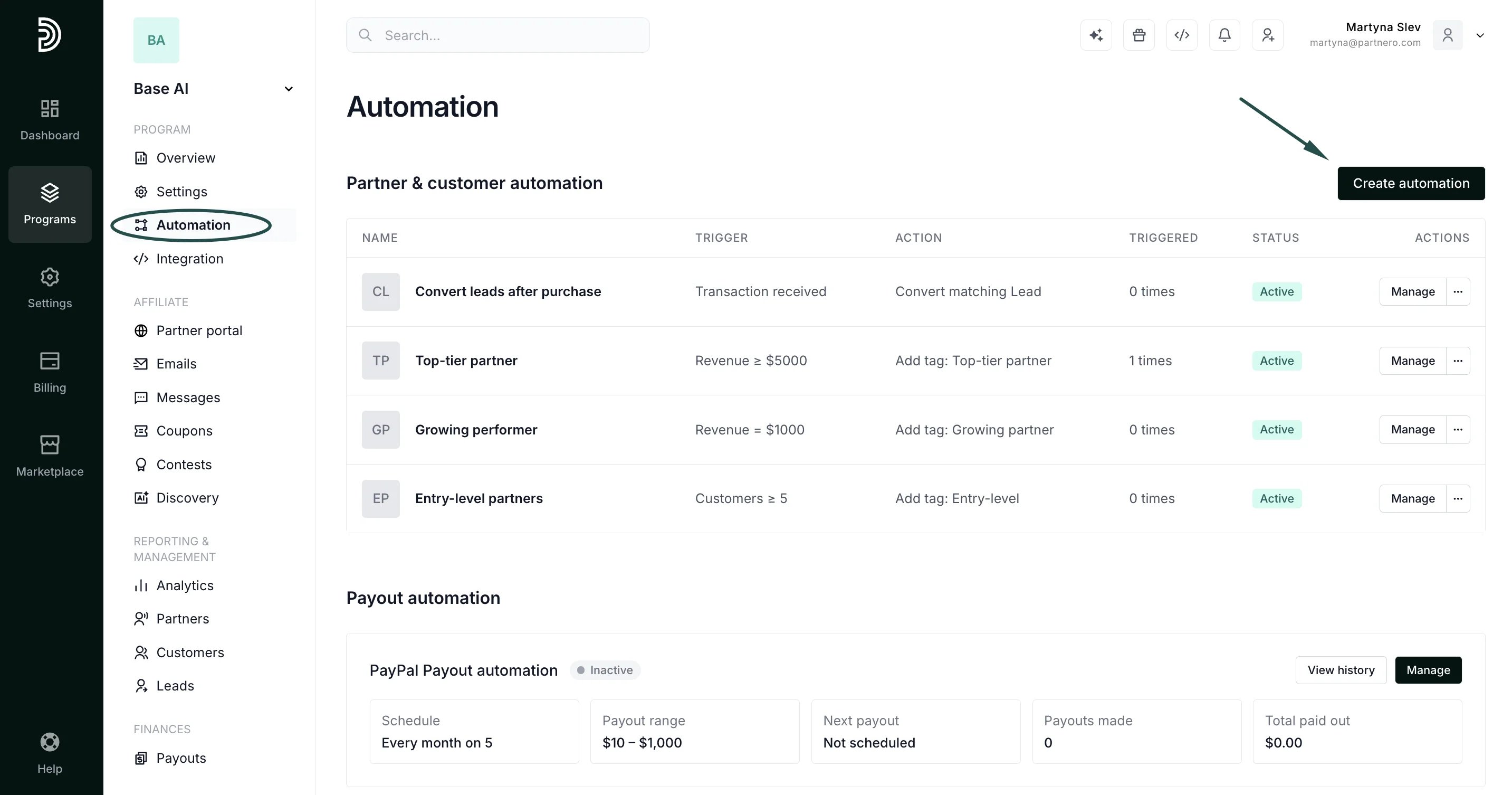 2. For the trigger, select **Tag is assigned to partner**.
3. Choose the tag that should start the automation.
4. For the action, select **Send email**.
5. Pick the email template to send, or click **Create new email** to build one ([read more about email templates](/knowledge-base/automation/automatically-send-emails-based-on-partner-activity)):
2. For the trigger, select **Tag is assigned to partner**.
3. Choose the tag that should start the automation.
4. For the action, select **Send email**.
5. Pick the email template to send, or click **Create new email** to build one ([read more about email templates](/knowledge-base/automation/automatically-send-emails-based-on-partner-activity)):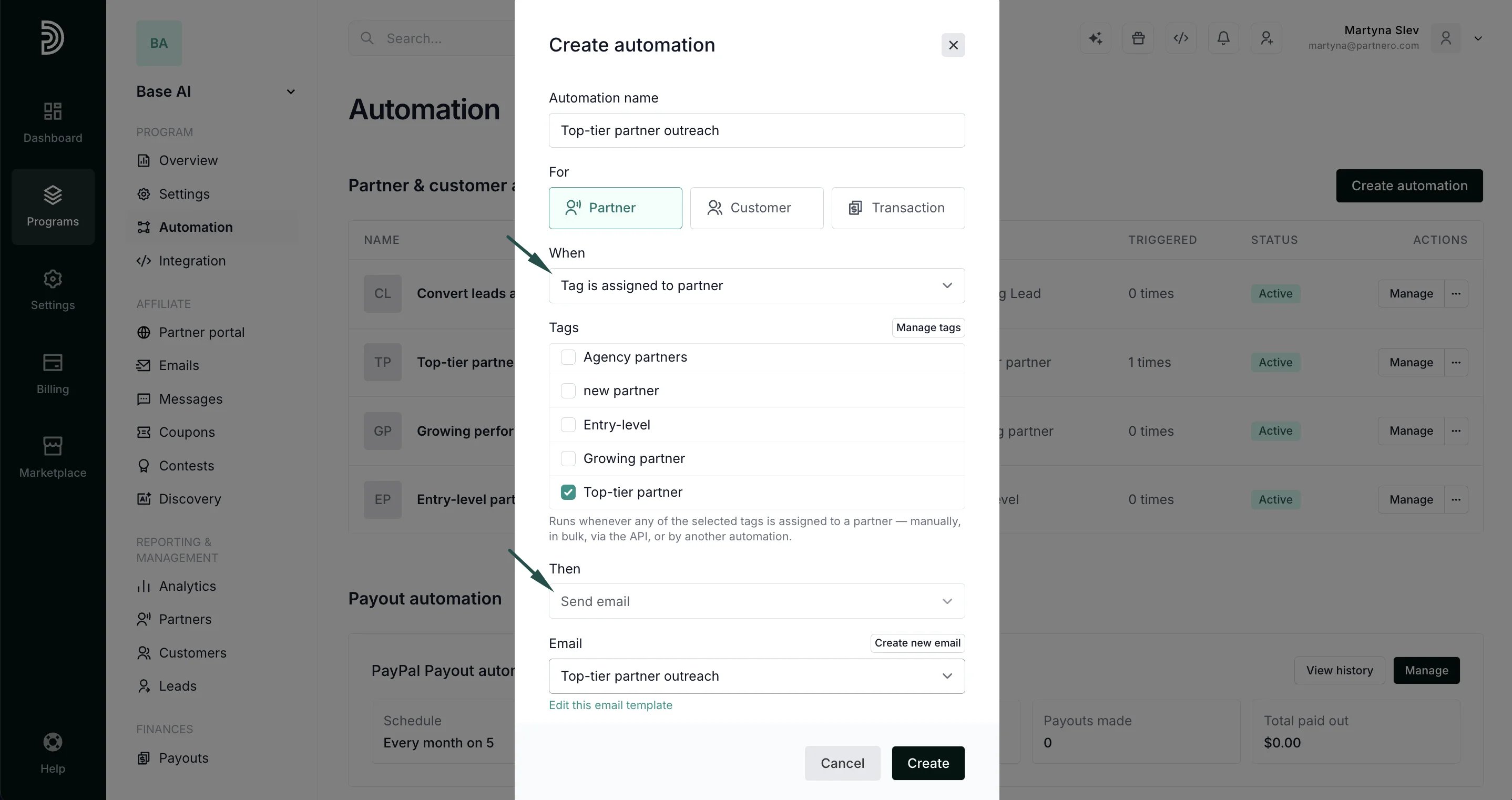 6. Click **Create** to save the automation.
***
### Use cases & examples
* Notify a partner as soon as they are marked VIP or moved into a higher tier
* Send a re-engagement email when a partner is tagged `at-risk` or `dormant`
* Follow up automatically when a partner is tagged `needs-onboarding`
* Send a reward or perks email when a partner is tagged `gold` or `champion`
A few common ways this trigger gets used in practice:
| Automation Name | Trigger | Action |
| - | - | - |
| VIP Welcome | Tag is assigned: `vip` | Send email: "Welcome to VIP" |
| Re-engagement | Tag is assigned: `at-risk` | Send email: "We haven't seen you in a while" |
| Onboarding Nudge | Tag is assigned: `needs-onboarding` | Send email: "Let's get you set up" |
| Tier Upgrade | Tag is assigned: `gold` | Send email: "You've unlocked Gold Tier" |
| Win Back | Tag is assigned: `win-back` | Send email: "We'd love to have you back" |
This documentation is built and hosted on [Mintlify](https://mintlify.com), a developer documentation platform.
6. Click **Create** to save the automation.
***
### Use cases & examples
* Notify a partner as soon as they are marked VIP or moved into a higher tier
* Send a re-engagement email when a partner is tagged `at-risk` or `dormant`
* Follow up automatically when a partner is tagged `needs-onboarding`
* Send a reward or perks email when a partner is tagged `gold` or `champion`
A few common ways this trigger gets used in practice:
| Automation Name | Trigger | Action |
| - | - | - |
| VIP Welcome | Tag is assigned: `vip` | Send email: "Welcome to VIP" |
| Re-engagement | Tag is assigned: `at-risk` | Send email: "We haven't seen you in a while" |
| Onboarding Nudge | Tag is assigned: `needs-onboarding` | Send email: "Let's get you set up" |
| Tier Upgrade | Tag is assigned: `gold` | Send email: "You've unlocked Gold Tier" |
| Win Back | Tag is assigned: `win-back` | Send email: "We'd love to have you back" |
This documentation is built and hosted on [Mintlify](https://mintlify.com), a developer documentation platform.