> ## Documentation Index
> Fetch the complete documentation index at: https://docs.partnero.com/llms.txt
> Use this file to discover all available pages before exploring further.
# Multi-level commission
### What is multi-level affiliate commission?
Multi-level (or multi-tier) affiliate commission is a compensation structure where affiliates earn commissions not only on the sales they generate directly, but also on sales made by affiliates they've recruited into the program.
This encourages affiliates to both drive sales and grow the affiliate network. Commissions cascade across levels, so affiliates can earn from the efforts of everyone they've brought in.
You can configure up to 5 levels:
* Level 1: Commission from direct sub-affiliate sales
* Level 2: Commission from 2nd-tier sub-affiliate sales
* Level 3: Commission from 3rd-tier sub-affiliate sales
* Level 4: Commission from 4th-tier sub-affiliate sales
* Level 5: Commission from 5th-tier sub-affiliate sales
###
***
How does multi-level commission work?
When someone signs up for your affiliate program through an existing affiliate's referral link, that affiliate is automatically recorded as the referring partner. No additional integration is needed.
Each affiliate at every level receives their commission separately. Multi-level commissions are always added on top of the default commission.
**Example:**
* Partner A refers Partner B to the program
* Partner B refers Partner C to the program
* Partner C makes a sale worth \$100
Commission distribution:
* Partner C (made the sale): 20% = \$20 (default commission)
* Partner B (Level 1 — referred Partner C): 10% = \$10
* Partner A (Level 2 — referred Partner B): 5% = \$5
Total commission paid: \$35
***
### How to set up multi-level commission
> ***⚠️ Important**: Please note that the* partner portal must have your domain connected *in order for this feature to be available.* [Here's how to do that](/knowledge-base/partner-portal/connect-a-partner-portal-domain)*. The program website domain and the partner portal domain have to match.*
To enable multi-level commission for your program:
1. Open your affiliate program and go to **Settings** under **Program**, and scroll down to **Commission**.
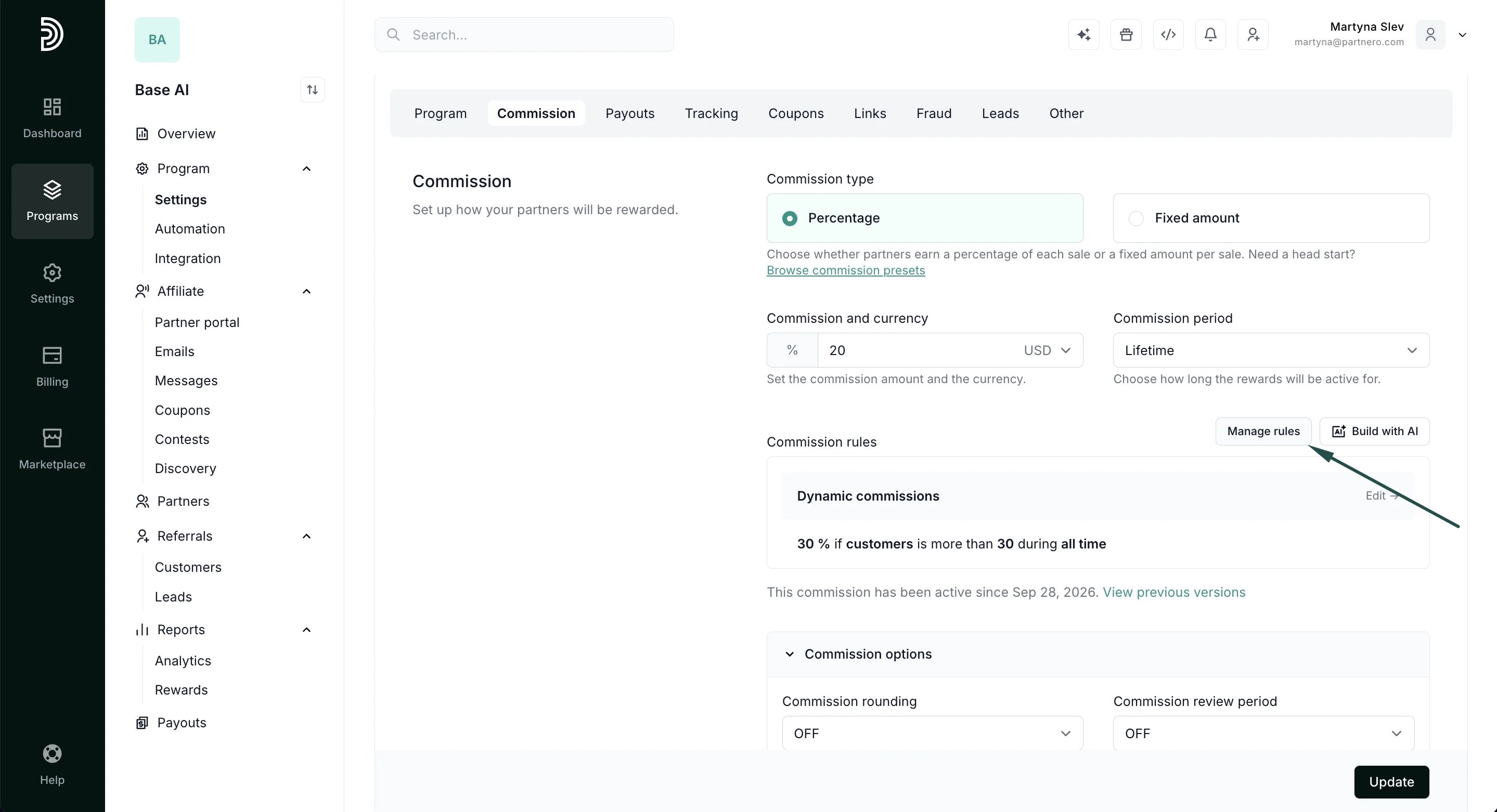
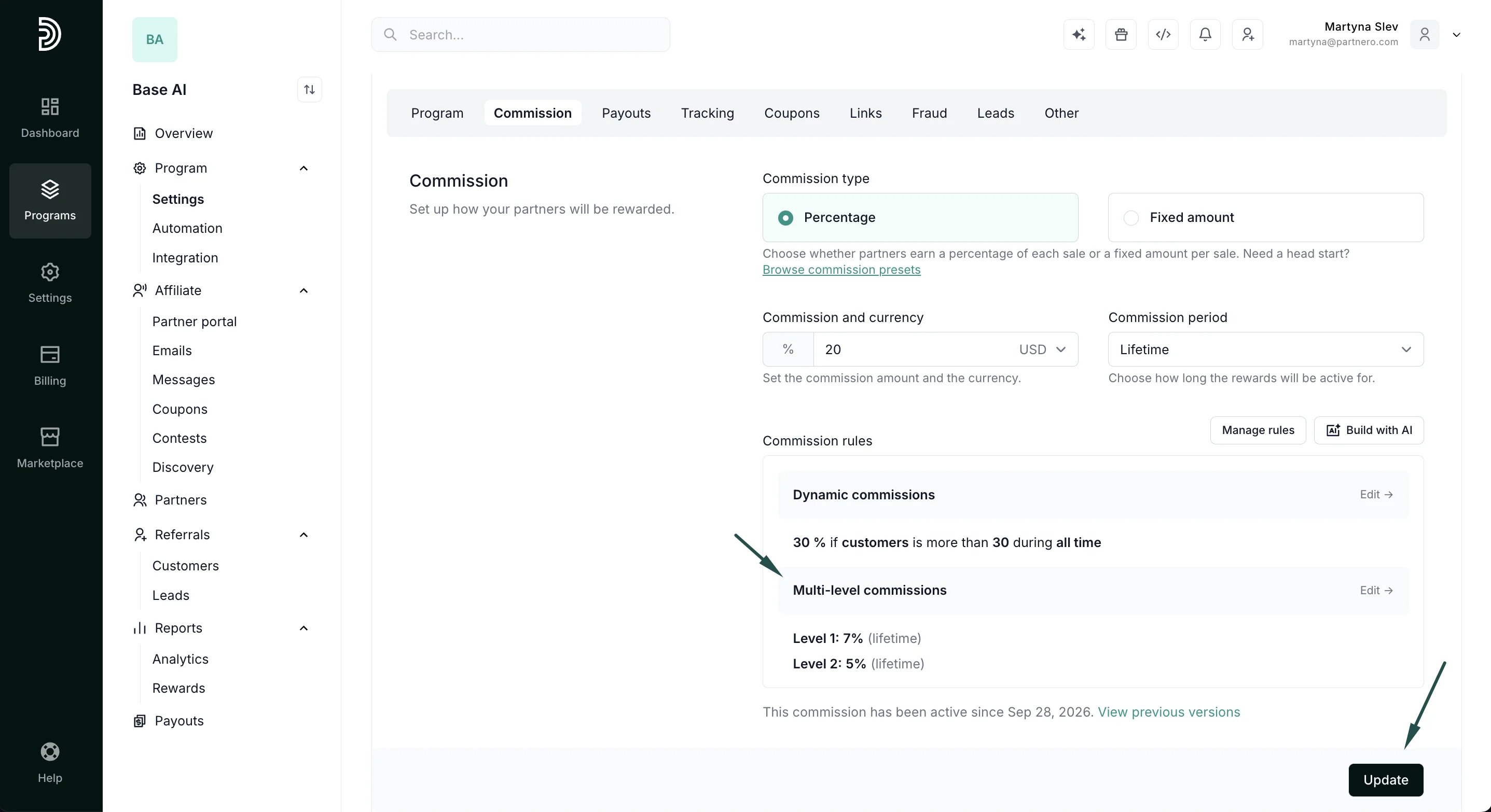
2. Toggle to **Enable multi-level affiliate commission**: 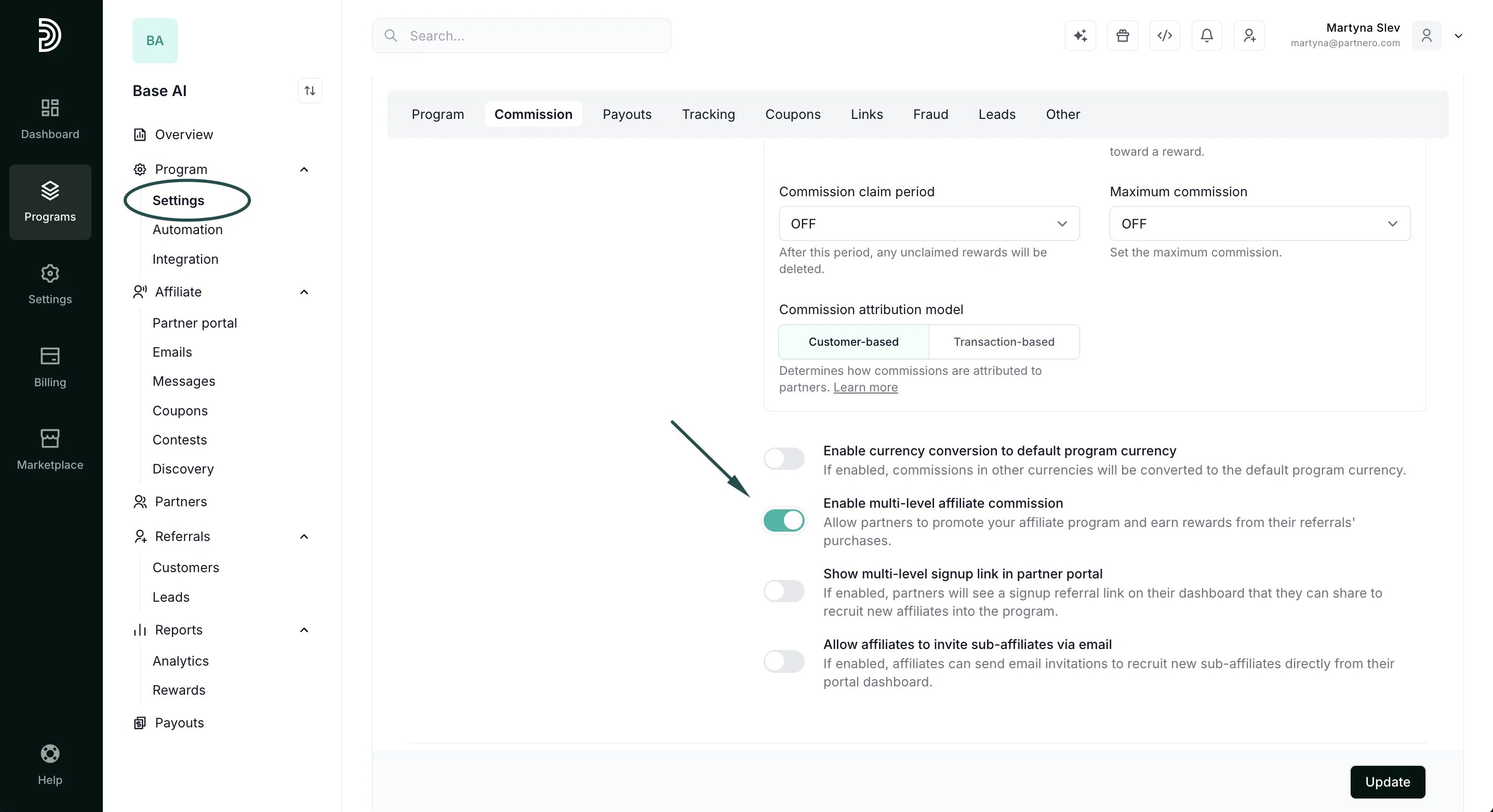 3. Click **Manage rules** next to **Commission rules** to open the Advanced commission modal:
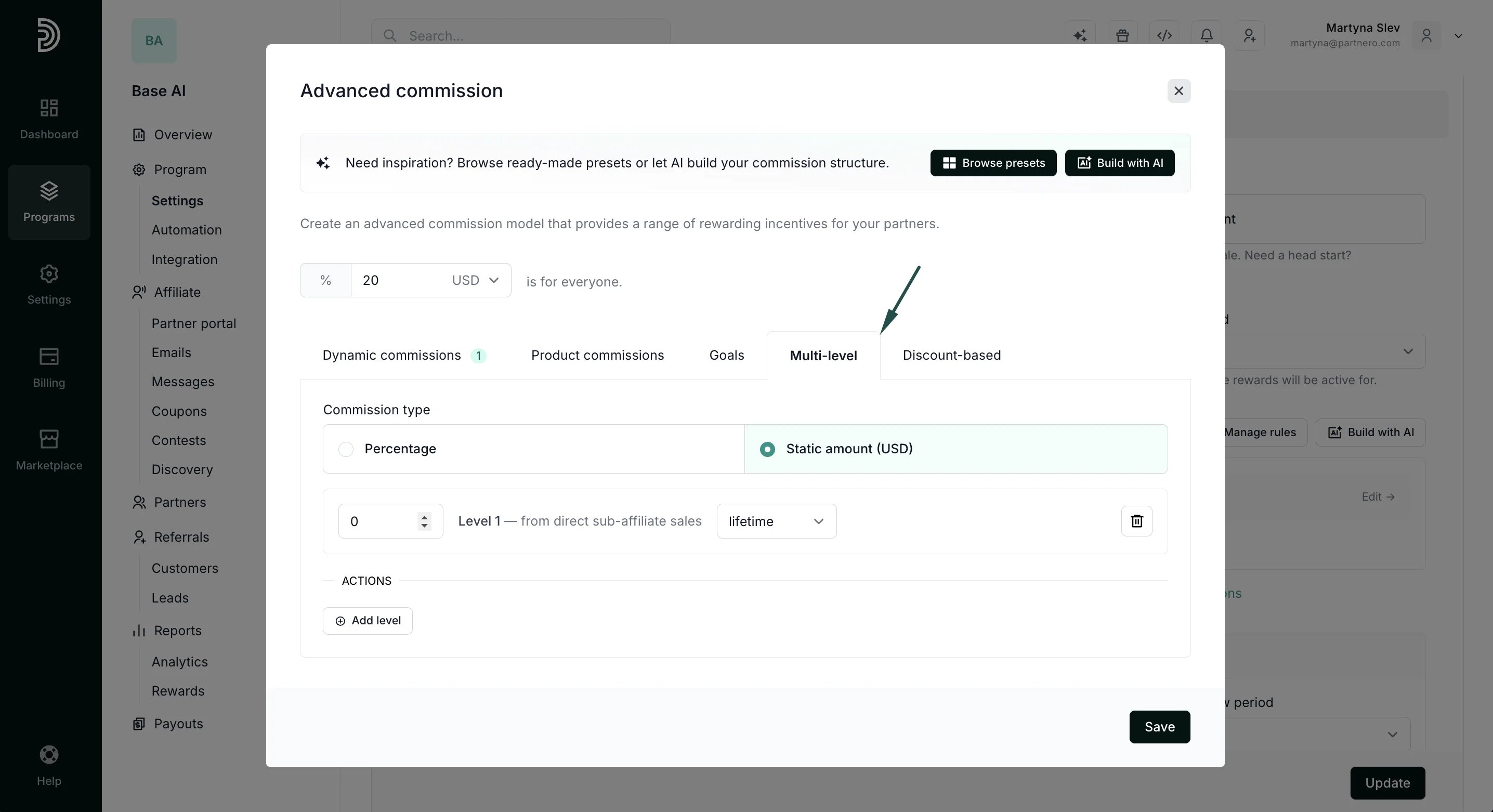
  4. Select the **Multi-lev\*\*\*\*el** tab:
  5. Choose the Commission type (Percentage or Static amount) - this applies to all levels.
6. Click **Add level** to add commission tiers:
* Enter the commission value for each level
* Select the commission period (lifetime, times, days, months, or years)
* Add up to 5 levels as needed
5. Choose the Commission type (Percentage or Static amount) - this applies to all levels.
6. Click **Add level** to add commission tiers:
* Enter the commission value for each level
* Select the commission period (lifetime, times, days, months, or years)
* Add up to 5 levels as needed 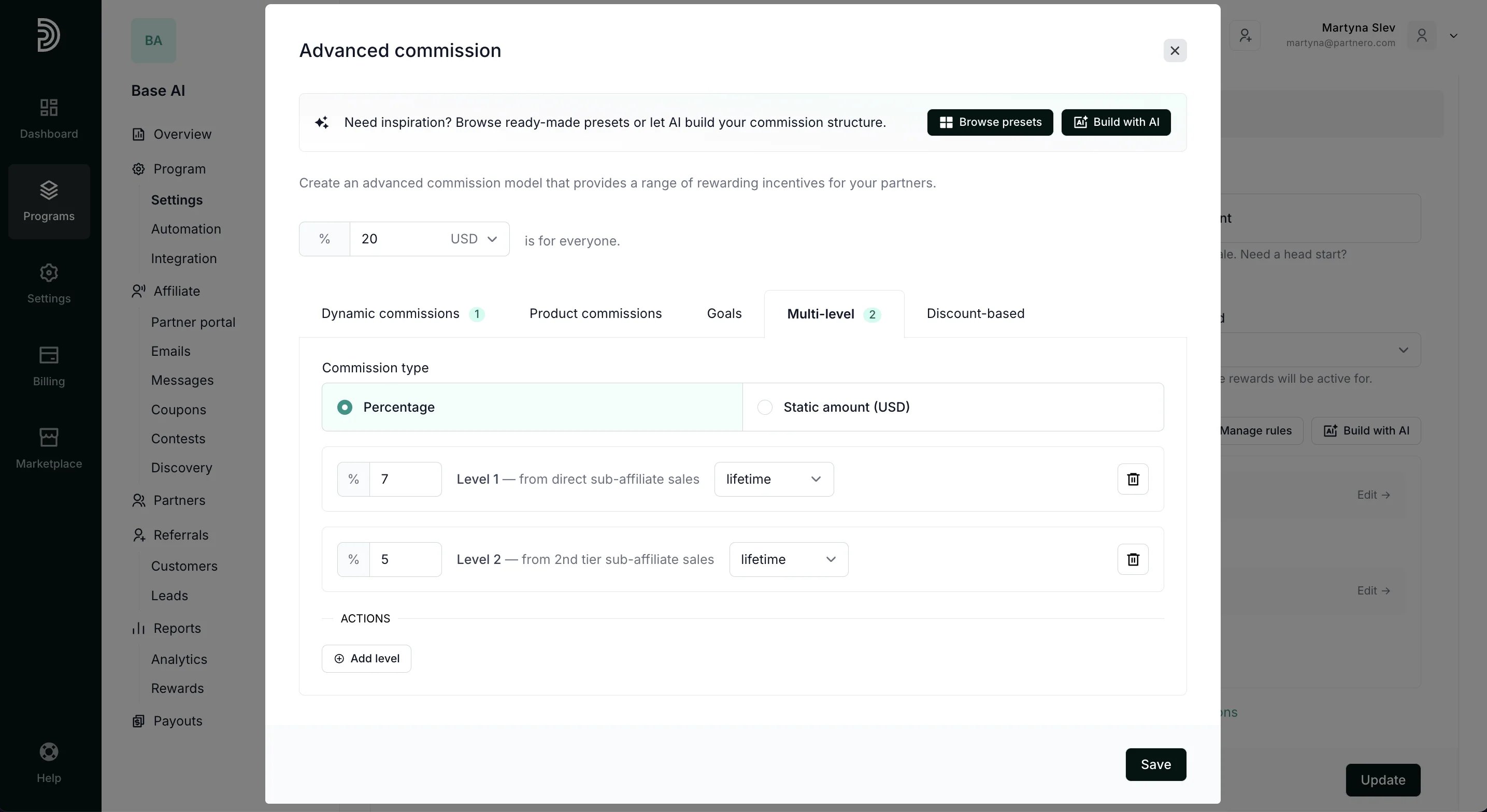 7. Click **Save** to close the modal, then **Update** to apply changes:
  ***
### Commission period options
For each level, you can configure how long the multi-level commission applies:
* **Lifetime**: Commission is earned on all future sales from that sub-affiliate chain
* **Times**: Commission is earned for a specific number of transactions (e.g., first 3 sales)
* **Days**/**Months**/**Years**: Commission is earned for a specific time period after the sub-affiliate joins
***
### Display the multi-level signup link in the partner portal dashboard
By default, affiliates see only their standard referral link on the partner portal dashboard. You can enable an additional signup link to appear alongside it, making it easy for affiliates to recruit other affiliates directly.
To enable it:
1. Go to **Settings** under Program, and scroll down to **Commission**.
2. Toggle to **Show multi-level signup link in partner portal**:
***
### Commission period options
For each level, you can configure how long the multi-level commission applies:
* **Lifetime**: Commission is earned on all future sales from that sub-affiliate chain
* **Times**: Commission is earned for a specific number of transactions (e.g., first 3 sales)
* **Days**/**Months**/**Years**: Commission is earned for a specific time period after the sub-affiliate joins
***
### Display the multi-level signup link in the partner portal dashboard
By default, affiliates see only their standard referral link on the partner portal dashboard. You can enable an additional signup link to appear alongside it, making it easy for affiliates to recruit other affiliates directly.
To enable it:
1. Go to **Settings** under Program, and scroll down to **Commission**.
2. Toggle to **Show multi-level signup link in partner portal**: 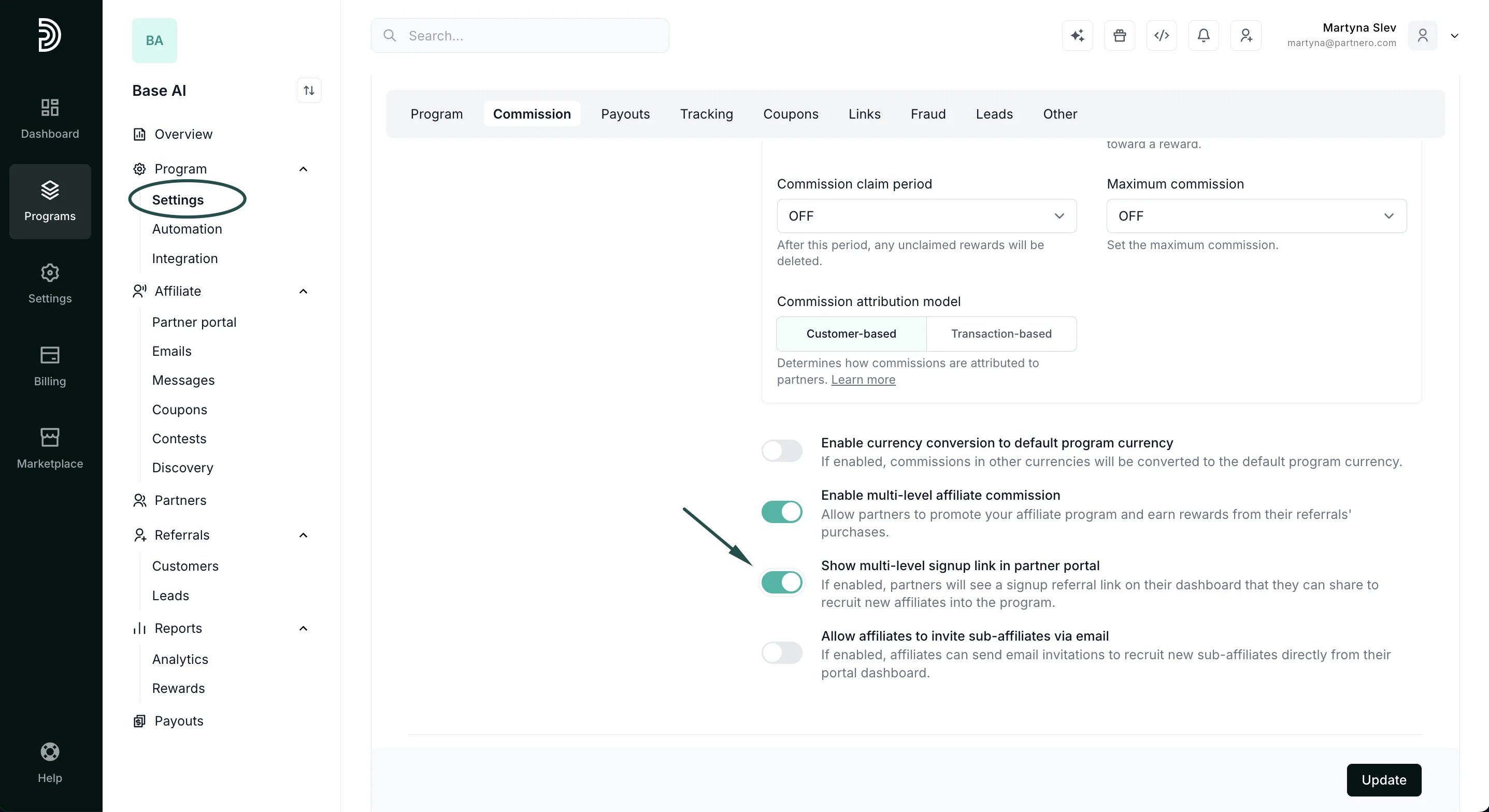 3. Click **Update**.
Here's how it looks on the partner portal:
3. Click **Update**.
Here's how it looks on the partner portal: 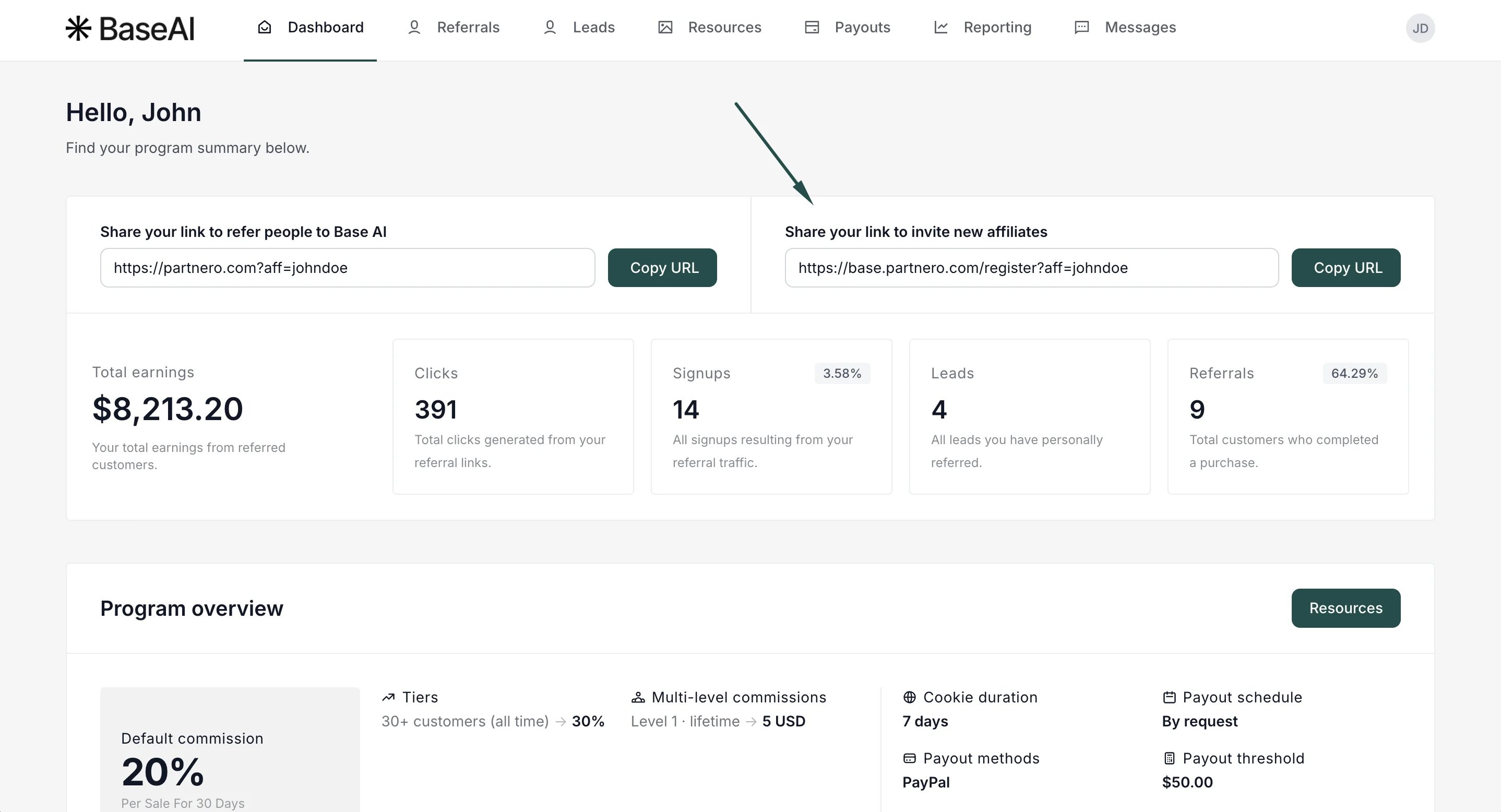 ***
### Allow affiliates to see the partners they referred
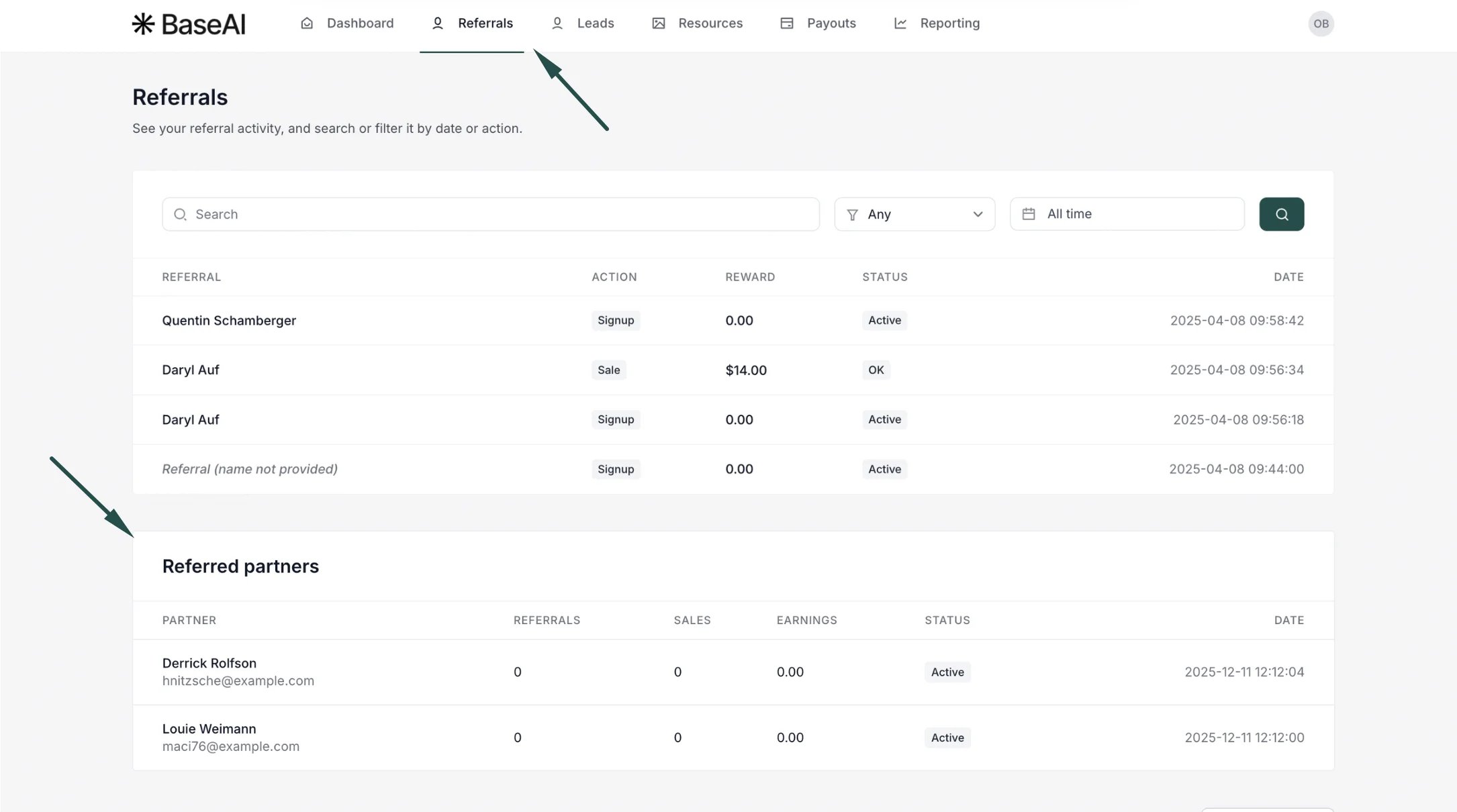
Give affiliates visibility into who they've recruited by displaying a referred partners table in the partner portal.
To enable it:
1. Go to **Partner Portal → Settings** and scroll down to the **Partner permissions** section.
2. Toggle **Show referred partners table**:
***
### Allow affiliates to see the partners they referred
Give affiliates visibility into who they've recruited by displaying a referred partners table in the partner portal.
To enable it:
1. Go to **Partner Portal → Settings** and scroll down to the **Partner permissions** section.
2. Toggle **Show referred partners table**: 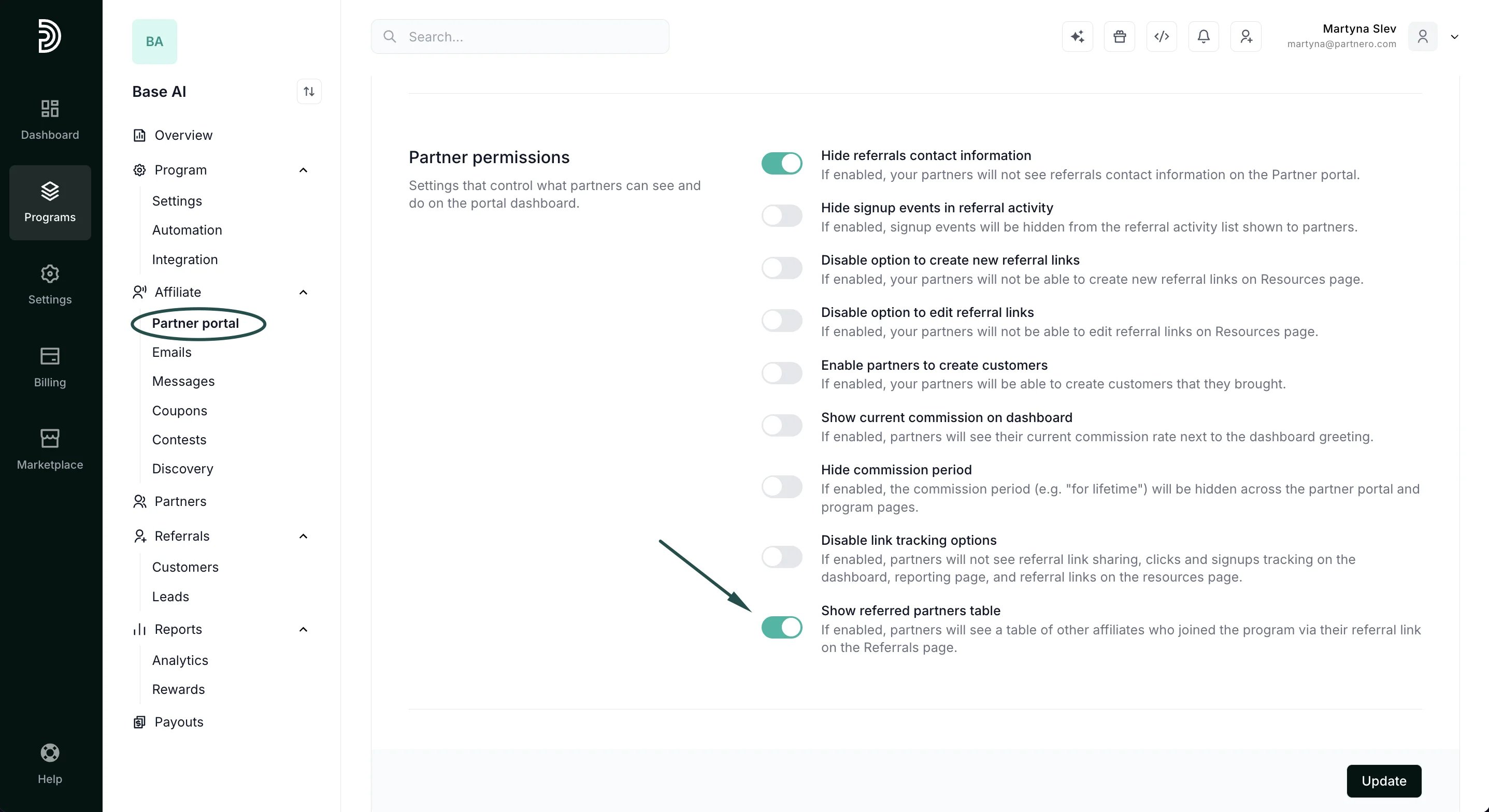 3. Click **Update** to publish changes.
> **Note:** This setting is only available if **multi-level commissions** are enabled and configured. By default, the referred affiliates table is not shown.
***
### View multi-level commissions in the Partner Portal
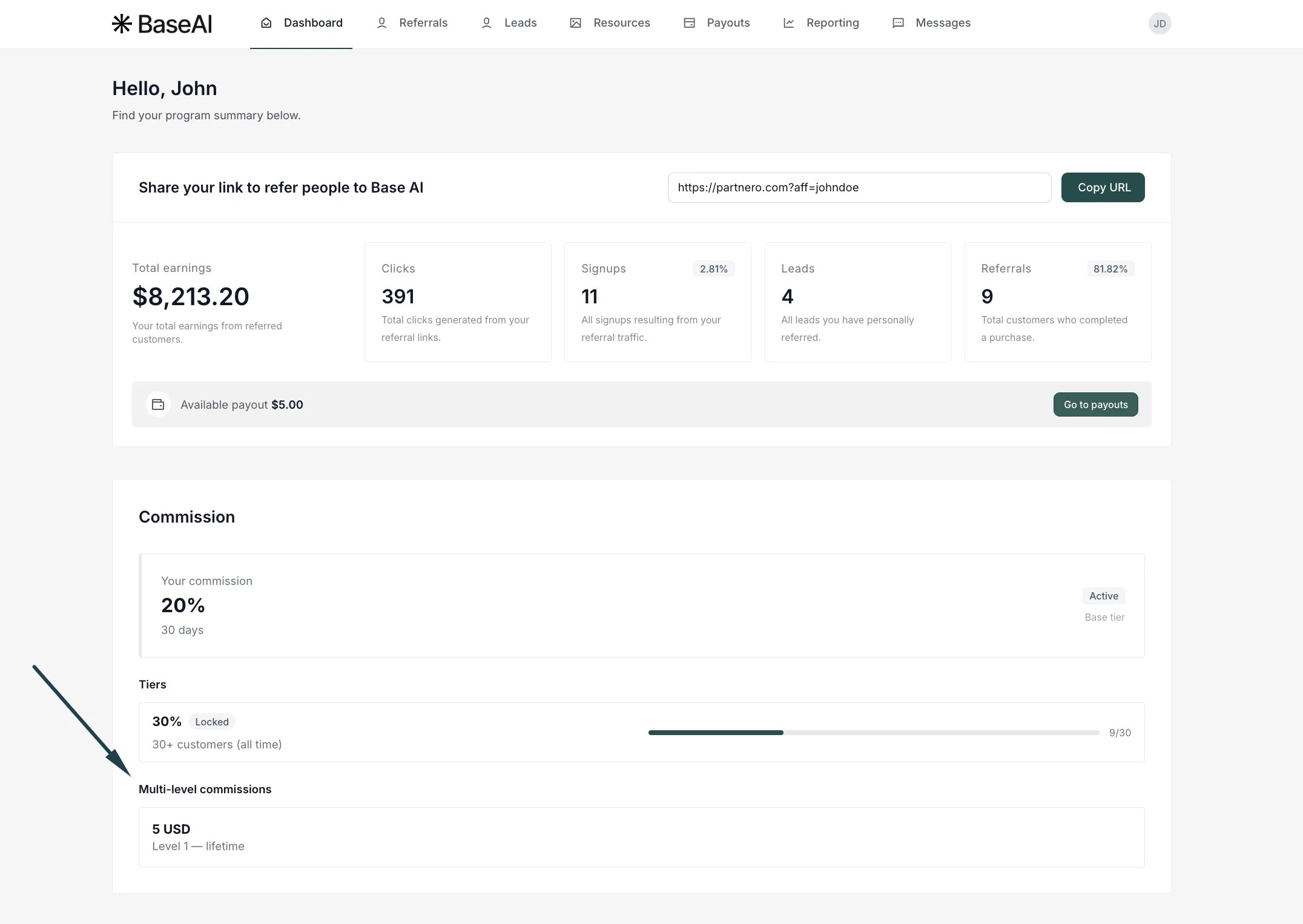
Partners can view their multi-level commission structure on the Partner Portal dashboard under the [Commission Structure section](/knowledge-base/partner-portal/display-commission-structure-in-the-partner-dashboard) (if enabled). Each configured level is displayed with its commission rate and period.
3. Click **Update** to publish changes.
> **Note:** This setting is only available if **multi-level commissions** are enabled and configured. By default, the referred affiliates table is not shown.
***
### View multi-level commissions in the Partner Portal
Partners can view their multi-level commission structure on the Partner Portal dashboard under the [Commission Structure section](/knowledge-base/partner-portal/display-commission-structure-in-the-partner-dashboard) (if enabled). Each configured level is displayed with its commission rate and period.
 In the **Referrals** activity list, each multi-level commission is labeled with its tier (e.g., "Multi-level commission (Level 1)") so affiliates can easily see where each commission came from.
 ***
### View the referred partners list
The list of referred partners can be accessed in the affiliate partner's profile. [Click here to read more](/knowledge-base/partner-management/referred-partners-list).
This documentation is built and hosted on [Mintlify](https://mintlify.com), a developer documentation platform.
***
### View the referred partners list
The list of referred partners can be accessed in the affiliate partner's profile. [Click here to read more](/knowledge-base/partner-management/referred-partners-list).
This documentation is built and hosted on [Mintlify](https://mintlify.com), a developer documentation platform.