> ## Documentation Index
> Fetch the complete documentation index at: https://docs.partnero.com/llms.txt
> Use this file to discover all available pages before exploring further.
# Self-billing payout documents (Gutschrift / autofacturation / self-billing invoice)
> This article is for program owners. If you're an affiliate partner, see [Self-billing for partners](/knowledge-base/articles-for-partners/self-billing-and-tax-details-for-partners) instead.
### What is self-billing?
With self-billing, you (the merchant / program owner) issue the tax document for an affiliate partner's commission instead of the affiliate partner invoicing you. It's standard practice in several countries, e.g., Germany ( *Gutschrift* / Gutschriftverfahren), France (*autofacturation*), the UK, Switzerland, and across the EU. Partnero can generate these documents automatically for every payout.
> Self-billing is only valid where you and your partner have agreed to it in advance. Partnero does not create that agreement — you confirm one is in place when enabling the feature. These documents are an aid, not tax advice or a guarantee of VAT compliance.
***
### How to enable self-billing (program owner)
To enable this feature:
1. Go to Program **Settings** → **Payout settings**.
2. Under **Payout document**, choose **Self-billing document**: 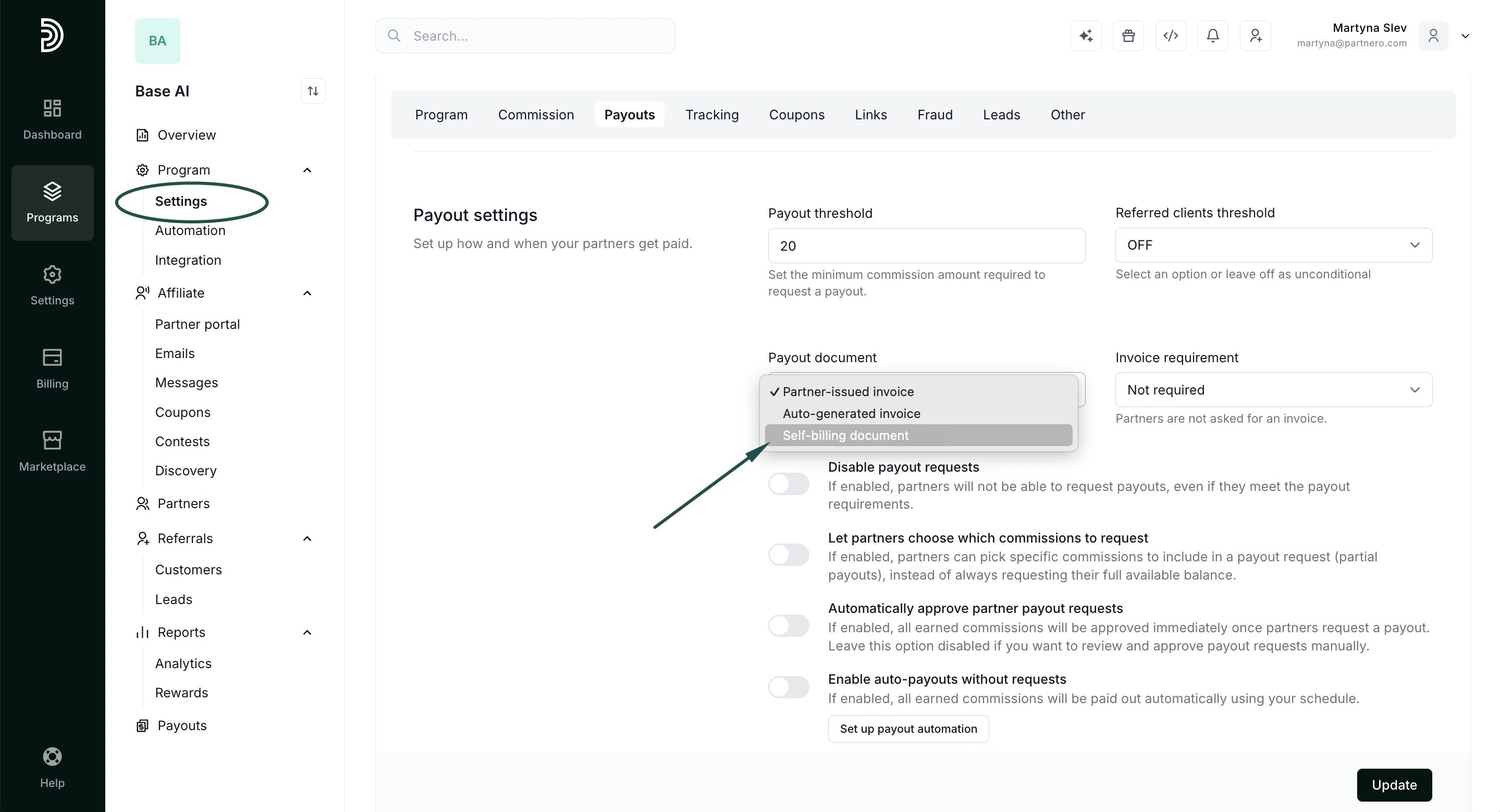 3. Tick "We have a self-billing agreement in place with our partners."
4. Optional settings:
* **Commission amount basis**: *Net* (VAT added on top of the payout) or *Gross* (the payout already includes VAT; the document total matches what the partner is paid).
* **Domestic VAT rate override** (%): leave empty to use your country's standard rate, or set a reduced rate for domestic supplies.
5. In **Bill to**, complete your company details, including your VAT ID (required where your country collects one).
3. Tick "We have a self-billing agreement in place with our partners."
4. Optional settings:
* **Commission amount basis**: *Net* (VAT added on top of the payout) or *Gross* (the payout already includes VAT; the document total matches what the partner is paid).
* **Domestic VAT rate override** (%): leave empty to use your country's standard rate, or set a reduced rate for domestic supplies.
5. In **Bill to**, complete your company details, including your VAT ID (required where your country collects one). 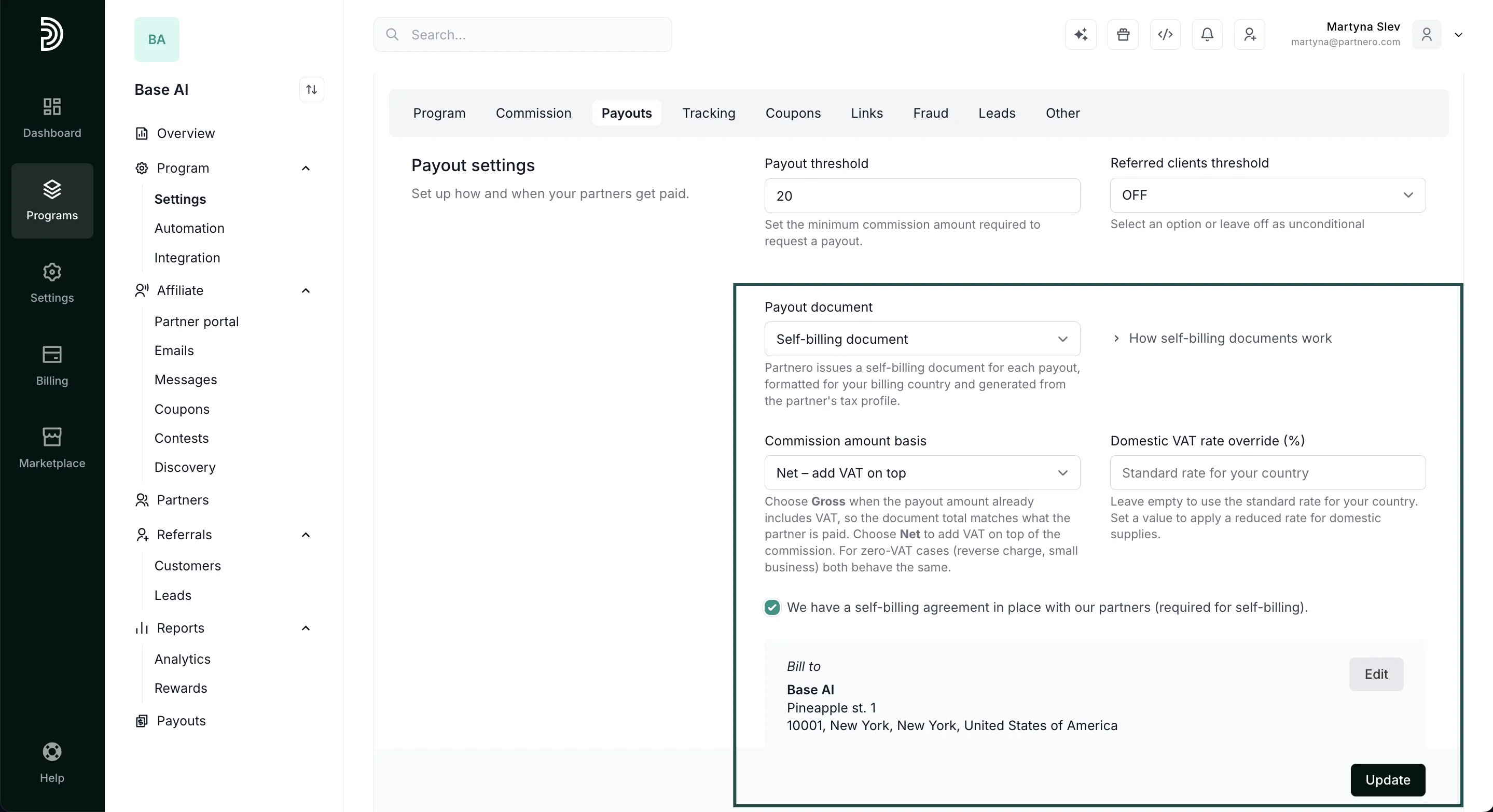 6. Click **Update** to save changes.
Country formats currently supported: Germany (Gutschrift), France (autofacturation), United Kingdom (self-billing invoice), Switzerland (Gutschrift), plus a generic self-billing format for other EU countries.
***
### Partner tax details
When self-billing is enabled, partners see a **Tax & billing** section in their profile (Profile → Tax & billing) and must complete:
* Legal name, street address, city, postal code, country
* VAT status: VAT-registered / Small business (VAT-exempt) / Not VAT-registered
* VAT ID (required for VAT-registered partners)
Partners save these together with the profile Update button. Payout requests are blocked until the details are complete — the payout window shows a prompt with a link to fill them in, and a reminder to review them once completed.
[How-to article for partners →](/knowledge-base/articles-for-partners/self-billing-and-tax-details-for-partners)
***
### What the document contains
For each payout, Partnero generates a PDF that includes:
* The correct local title (e.g. Gutschrift / Autofacturation / Self-billing invoice)
* Supplier (partner) and recipient (your) details, with both VAT IDs where applicable
* The service period covered by the commissions
* Net amount, VAT line, and total
* The applicable legal note, based on the partner's situation:
* Domestic partner → your country's VAT rate applied
* Other EU, VAT-registered partner → reverse charge (0%, VAT accounted for by the recipient)
* Small business / not VAT-registered → no VAT, with the relevant exemption note
* Outside scope → 0% with an "outside VAT scope" note
The document is attached to the payout automatically. Payout amounts remain your net commission — enabling self-billing does not change how much a partner is paid.
***
### FAQ
* \*\*Does this change payout amounts?
\*\*No. Amounts stay net; the document only presents VAT.
* **A partner is a small business; will VAT be added?**
No. Small-business partners get a 0% / VAT-exempt document.
* **My country isn't listed.**
Non-supported jurisdictions won't generate a self-billing document; use the standard invoice modes instead.
* **What if document generation fails?**
The payout still goes through; the document can be regenerated.
This documentation is built and hosted on [Mintlify](https://mintlify.com), a developer documentation platform.
6. Click **Update** to save changes.
Country formats currently supported: Germany (Gutschrift), France (autofacturation), United Kingdom (self-billing invoice), Switzerland (Gutschrift), plus a generic self-billing format for other EU countries.
***
### Partner tax details
When self-billing is enabled, partners see a **Tax & billing** section in their profile (Profile → Tax & billing) and must complete:
* Legal name, street address, city, postal code, country
* VAT status: VAT-registered / Small business (VAT-exempt) / Not VAT-registered
* VAT ID (required for VAT-registered partners)
Partners save these together with the profile Update button. Payout requests are blocked until the details are complete — the payout window shows a prompt with a link to fill them in, and a reminder to review them once completed.
[How-to article for partners →](/knowledge-base/articles-for-partners/self-billing-and-tax-details-for-partners)
***
### What the document contains
For each payout, Partnero generates a PDF that includes:
* The correct local title (e.g. Gutschrift / Autofacturation / Self-billing invoice)
* Supplier (partner) and recipient (your) details, with both VAT IDs where applicable
* The service period covered by the commissions
* Net amount, VAT line, and total
* The applicable legal note, based on the partner's situation:
* Domestic partner → your country's VAT rate applied
* Other EU, VAT-registered partner → reverse charge (0%, VAT accounted for by the recipient)
* Small business / not VAT-registered → no VAT, with the relevant exemption note
* Outside scope → 0% with an "outside VAT scope" note
The document is attached to the payout automatically. Payout amounts remain your net commission — enabling self-billing does not change how much a partner is paid.
***
### FAQ
* \*\*Does this change payout amounts?
\*\*No. Amounts stay net; the document only presents VAT.
* **A partner is a small business; will VAT be added?**
No. Small-business partners get a 0% / VAT-exempt document.
* **My country isn't listed.**
Non-supported jurisdictions won't generate a self-billing document; use the standard invoice modes instead.
* **What if document generation fails?**
The payout still goes through; the document can be regenerated.
This documentation is built and hosted on [Mintlify](https://mintlify.com), a developer documentation platform.