> ## Documentation Index
> Fetch the complete documentation index at: https://docs.partnero.com/llms.txt
> Use this file to discover all available pages before exploring further.
# Refer-a-friend: Auto-apply promotion codes at checkout
### What is auto-apply for promotion codes?
Auto-apply allows promotion codes to be automatically included in your customers' referral links. When a friend clicks a referral link, the promotion code is passed to your website and is automatically pre-filled in the coupon input field at checkout, creating a seamless discount experience for new customers.
***
### Requirements
To use auto-apply promotion codes, you need:
1. An active integration (Stripe, Paddle Billing, Shopify, or WooCommerce) or a custom API setup
2. At least one coupon with [promotion codes](/knowledge-base/shopify/how-to-use-promotion-codes) assigned to customers
3. The Partnero tracking script installed on your website.
***
### How to enable auto-apply promotion codes
Follow the two-step process to enable auto-apply promotion codes for your program.
#### Step 1: Enable "Include promotion codes in referral links"
1. Go to **Settings** in your program dashboard and scroll down to the **Coupon tracking** section.
2. Toggle *Include promotion codes in referral links*: 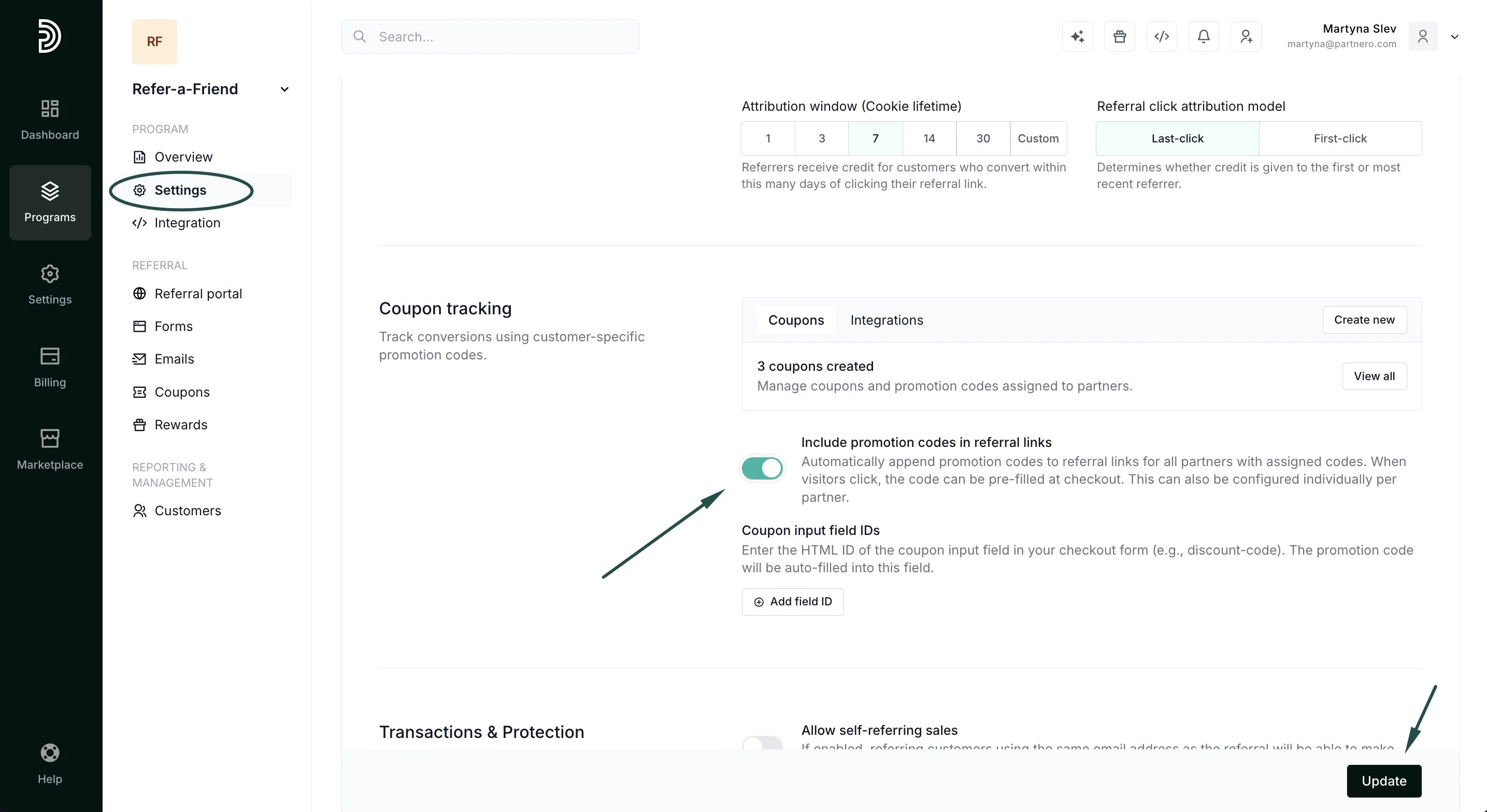 3. Click **Update**.
When enabled, this setting automatically appends the customer's promotion code to all their referral links. For example:
* Original link: [https://yoursite.com/?via=john](https://yoursite.com/?via=john)
* With promotion code: [https://yoursite.com/?via=john\&coupon=JOHN20](https://yoursite.com/?via=john\&coupon=JOHN20)
Note: This can also be configured individually for each partner on their profile page.
#### Step 2: Configure coupon input field IDs
Coupon input field IDs tell Partnero where to auto-fill the promotion code on your checkout page.
1. Under **Program** → **Coupon tracking** section, find the *Coupon input field IDs*.
2. Click **Add field ID**:
3. Click **Update**.
When enabled, this setting automatically appends the customer's promotion code to all their referral links. For example:
* Original link: [https://yoursite.com/?via=john](https://yoursite.com/?via=john)
* With promotion code: [https://yoursite.com/?via=john\&coupon=JOHN20](https://yoursite.com/?via=john\&coupon=JOHN20)
Note: This can also be configured individually for each partner on their profile page.
#### Step 2: Configure coupon input field IDs
Coupon input field IDs tell Partnero where to auto-fill the promotion code on your checkout page.
1. Under **Program** → **Coupon tracking** section, find the *Coupon input field IDs*.
2. Click **Add field ID**: 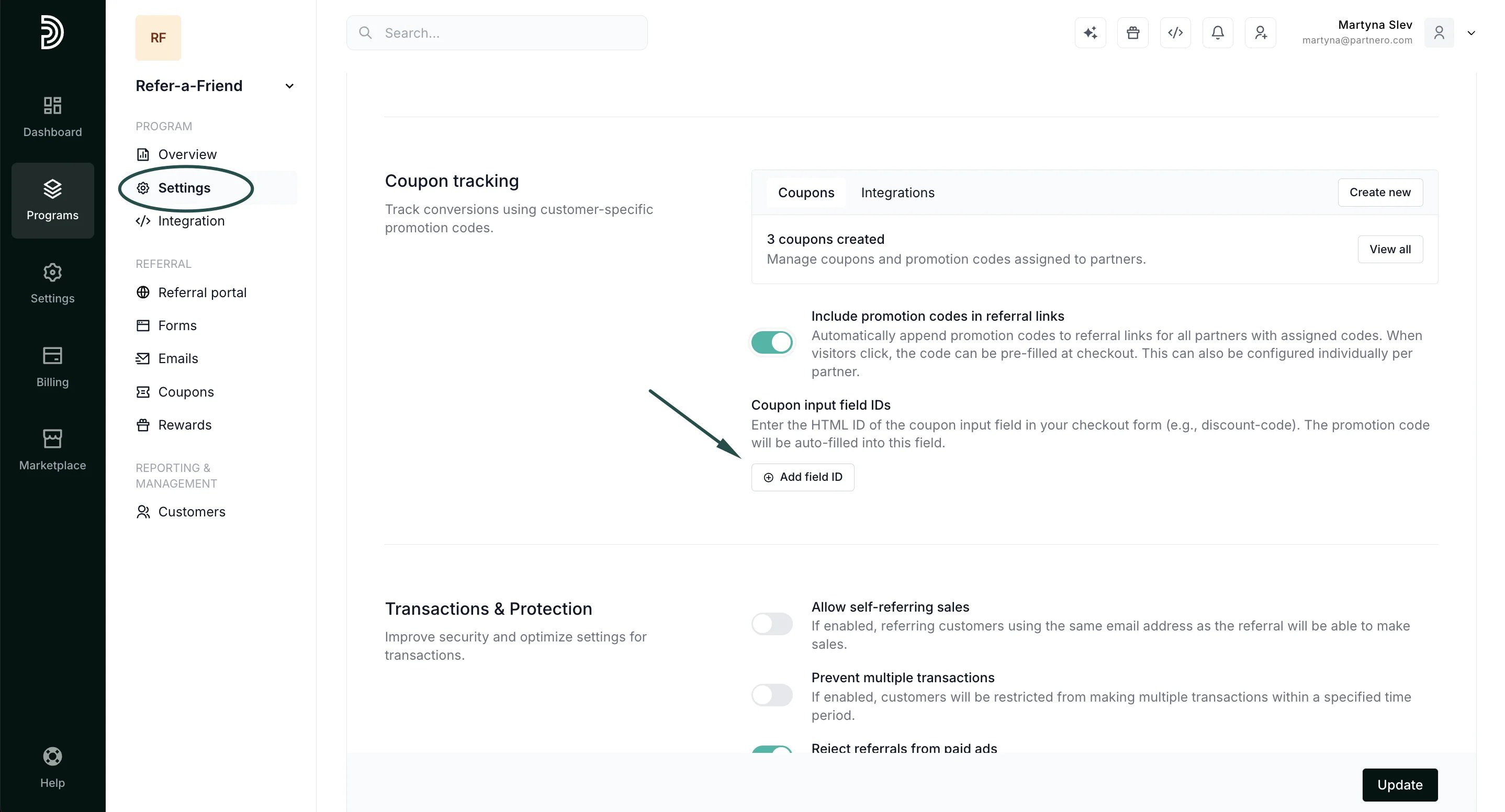 3. Enter the HTML ID of your coupon input field (e.g., discount-code).
4. Click **Update**.
3. Enter the HTML ID of your coupon input field (e.g., discount-code).
4. Click **Update**. 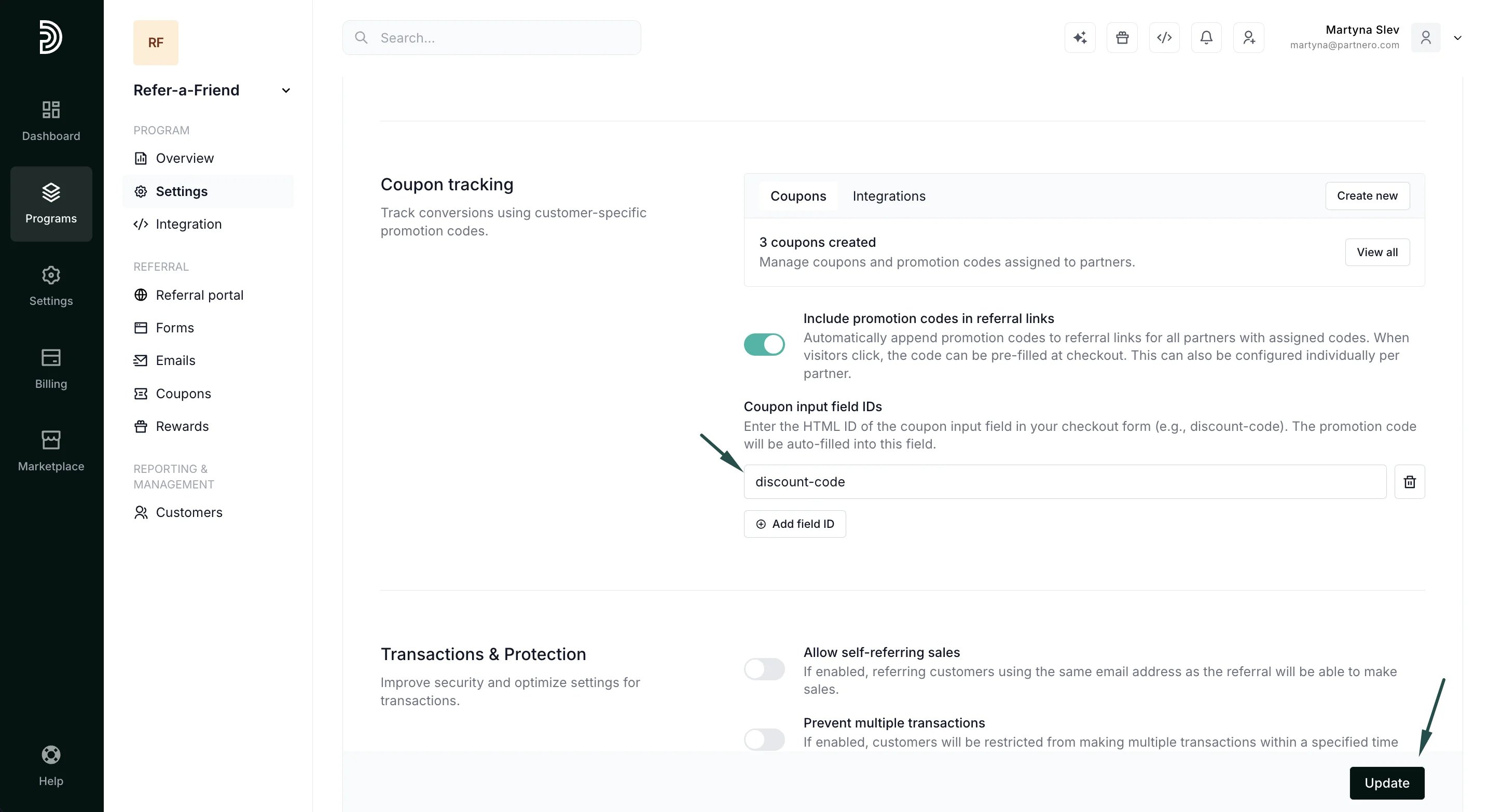 You can add multiple field IDs if your website has different checkout pages with different coupon field names.
**Important**: Make sure the field ID exactly matches your checkout form (IDs are case-sensitive).
***
### Auto-apply with Stripe
Stripe offers several ways to accept payments. How auto-apply works depends on which Stripe product you're using:
**Stripe Payment Links**
Automatic coupon application is fully supported with Stripe Payment Links.
When a visitor clicks a partner's referral link that includes a promotion code (e.g., ?coupon=JOHN20), the coupon is automatically applied at the Stripe Payment Link checkout. No additional configuration is needed; it just works.
**Custom checkout page**
If you have a custom checkout page (not using Stripe's hosted solutions), configure the coupon input field ID as described in Step 2, and Partnero will auto-fill the code into your form.
***
This documentation is built and hosted on [Mintlify](https://mintlify.com), a developer documentation platform.
You can add multiple field IDs if your website has different checkout pages with different coupon field names.
**Important**: Make sure the field ID exactly matches your checkout form (IDs are case-sensitive).
***
### Auto-apply with Stripe
Stripe offers several ways to accept payments. How auto-apply works depends on which Stripe product you're using:
**Stripe Payment Links**
Automatic coupon application is fully supported with Stripe Payment Links.
When a visitor clicks a partner's referral link that includes a promotion code (e.g., ?coupon=JOHN20), the coupon is automatically applied at the Stripe Payment Link checkout. No additional configuration is needed; it just works.
**Custom checkout page**
If you have a custom checkout page (not using Stripe's hosted solutions), configure the coupon input field ID as described in Step 2, and Partnero will auto-fill the code into your form.
***
This documentation is built and hosted on [Mintlify](https://mintlify.com), a developer documentation platform.