

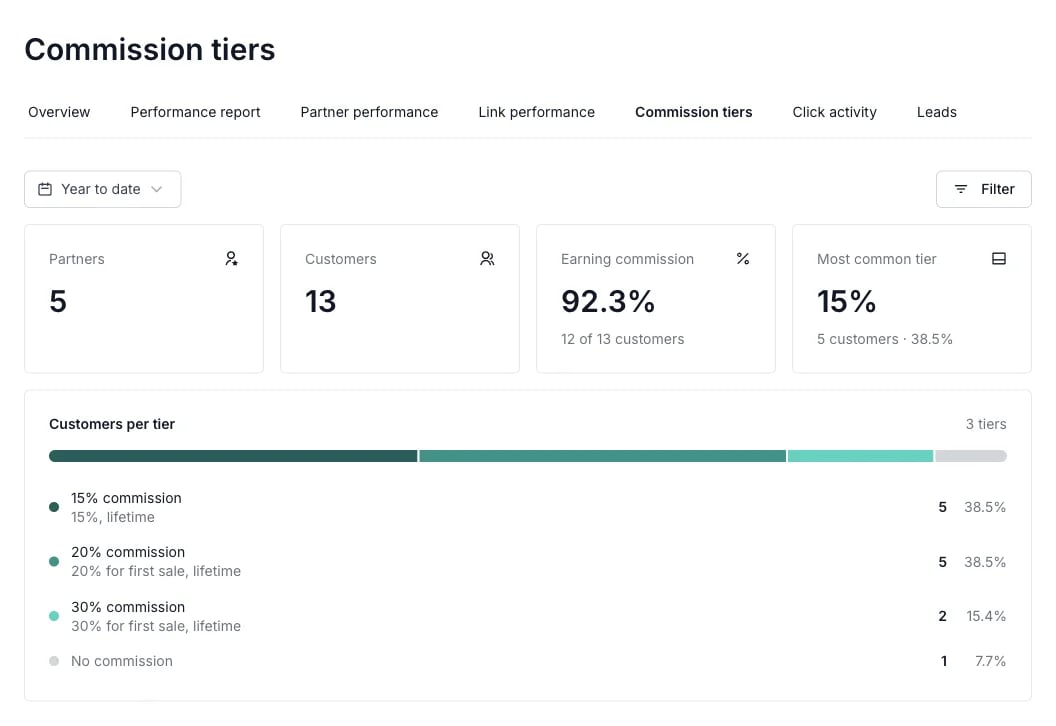
How customers are counted
Each customer is counted once, in the tier of their most recent sale commission. The rate comes from the commission itself, so the report shows what customers actually earn, including rates from reward rules that have since ended or been deleted.- Counted commissions: Approved, in-review and paused commissions count. Refunded, declined and fraudulent ones don’t.
- Own partner only: Only commissions earned by the customer’s current partner count. If a customer was moved from another partner, or has additional partners, those other commissions are ignored.
- No commission: Customers with no counted sale commission. Usually they haven’t made a purchase yet, but it also covers customers whose commissions were all refunded or declined, sales where no reward rule applied, and customers who only earned non-sale rewards such as a sign-up bonus.
- Mixed rates: Commissions with different rates per product.
- Other rates: Commissions whose rate isn’t a single percentage or fixed amount.
- Rate not recorded: Older commissions created before Partnero stored the rate on each commission. They’re counted, but the rate can’t be shown.
Summary metrics
- Partners: Partners with at least one customer in the selected period.
- Customers: Customers of those partners who signed up in the selected period.
- Earning commission: The share of those customers who have a counted commission. Click the card to see all partners.
- Most common tier: The rate the most customers are on. Click the card to see only the partners with customers in that tier.
- Customers per tier: A bar showing how customers split across tiers. The list below it names the reward rules behind each tier, with the number and share of customers in it.
- Define your time period: The report counts customers by their sign-up date and opens on Year to date. Choose a pre-defined period, enter a custom one, or pick All time to include every customer, including imported customers who signed up before the program was created.
- Filter by partner: See the tier breakdown for one partner.
- Filter by partner tags: See the breakdown for a specific group of partners.
Partners by commission tier
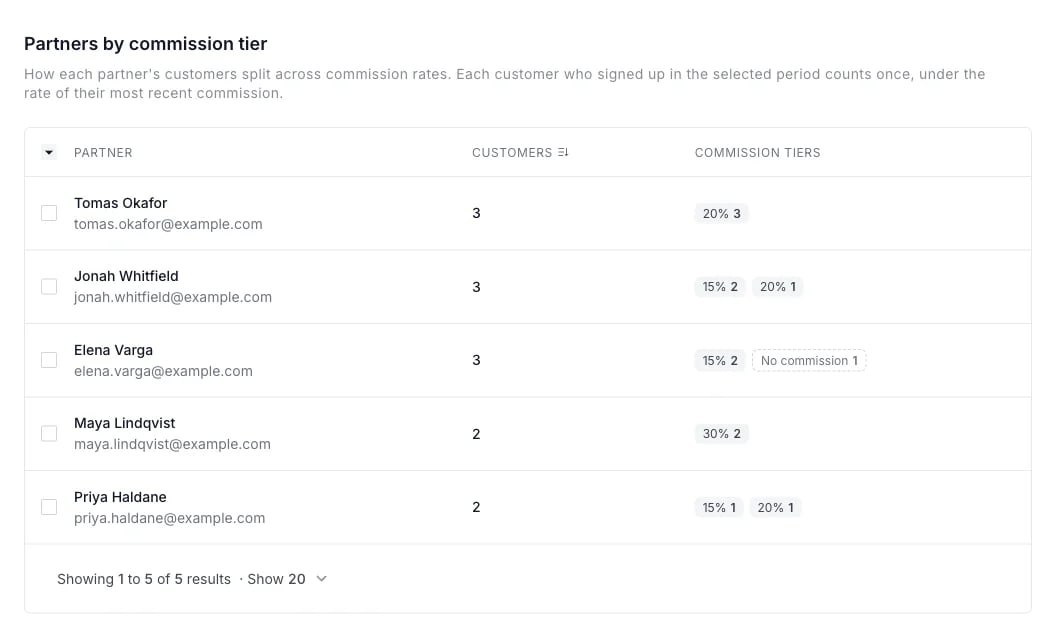
- Columns: Partner, Customers, and Commission tiers, showing how many of the partner’s customers are in each tier.
- Tier links: Click a tier to open rewards history for that partner and tier. Rewards history lists every reward, so it can also include refunded rewards and earlier rewards of customers who have since moved to another tier.
- Sortable by partner name or customer count, or by the selected tier. Exportable to CSV with one column per tier. The export follows the table’s sorting and tier selection.
Commission tiers on the partner profile
A partner’s profile shows the same breakdown in a Commission tiers section, above Rewards distribution. It appears when the partner’s customers are spread across at least two tiers.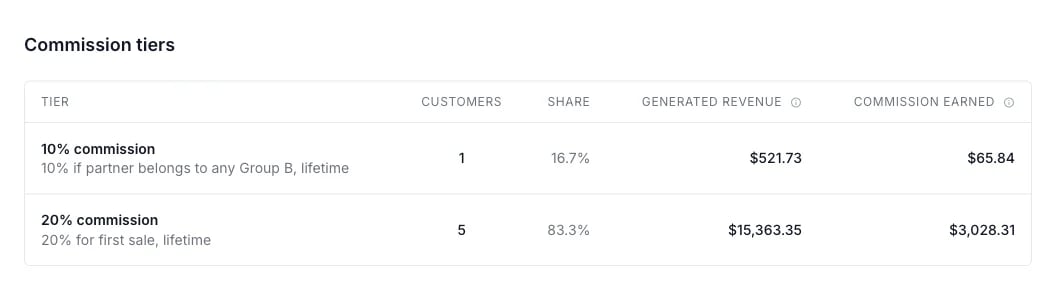
- Generated revenue: All approved sales from customers currently in this tier, excluding rewards in review.
- Commission earned: All approved commission earned on customers currently in this tier, paid or not, excluding rewards in review.
Customers of deleted partners aren’t included, so the customer count can be lower than on the Customers page.
Continue reading about analytics
Explore other analytics reports to better understand your performance and optimize your partner program:- Analytics Overview – High-level dashboard summary of your program’s performance
- Performance Report – Detailed breakdown of conversions, revenue, and partner results
- Partner Performance – Compare and evaluate individual partner results
- Link Performance – See which referral links drive traffic and signups
- Click Activity – Review detailed click-level data and traffic insights
- Lead Analytics – Monitor lead acquisition trends and quality